• Debian 11 is approaching its end-of-life (vendor EOL date - August 31, 2026). Plesk Obsidian 18.0.80 will be the last release to support it.
    If you are running Plesk Obsidian on Debian 11, we recommend you upgrade those servers to Debian 12 using our dist-upgrade tool.
  • We plan to deprecate and remove the support for XML RPC protocol versions earlier than 1.6.9.1 in Plesk Obsidian 18.0.82. We strongly recommend that you update all existing integrations using earlier versions of the XML RPC protocol to comply with the version 1.6.9.1 specification.

Issue Can not enable RDP in firewall

Adrian.Ilchuk

New Pleskian
Server operating system version
Windows Server 2022
Plesk version and microupdate number
18.0.63 Update #4
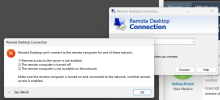
I can not re-enable access to RDP for me server through the Plesk Firewall rules. I've tried disabling and re-enabling it and rebooting the server. However, when I try a remote desktop to the server it comes up that it's not enabled.

1728391697991.png

Any help would be greatly appreciated.
 
Hey, @Adrian.Ilchuk. From the screenshot attached it looks like the rule is currently properly enabled in the Firewall, so it shouldn't be blocking the connection. What's the exact error message you get when you attempt to connect?
 
The more likely issue is that there is 2 rules in the firewall that's blocking RDP. My recommendation is to disable the firewall completely so you can RDP to the server, open "Windows Defender Firewall with Advanced Security" control panel applet, find RDP rules and delete them from inbound rules, then while on the server log back into the plesk and re-enable the firewall, switch back to the windows defender firewall applet and refresh for new entries and make sure there's only 2 at most (one should be for the private profile and one for public or all, ideally there should only be 1 for all profiles).
 
I've tried turning off firewall protection in Plesk but it still shows the eth0 interface has a firewall status of On. My server is a VPS through GoDaddy so I can't access it other than through RDP which is no longer working.
 
Back
Top