• Debian 11 is approaching its end-of-life (vendor EOL date - August 31, 2026). Plesk Obsidian 18.0.80 will be the last release to support it.
    If you are running Plesk Obsidian on Debian 11, we recommend you upgrade those servers to Debian 12 using our dist-upgrade tool.
  • We plan to deprecate and remove the support for XML RPC protocol versions earlier than 1.6.9.1 in Plesk Obsidian 18.0.82. We strongly recommend that you update all existing integrations using earlier versions of the XML RPC protocol to comply with the version 1.6.9.1 specification.

Resolved Cannot connect to the server through Chrome

The 8th

Regular Pleskian
Server operating system version
Plesk Obsidian Web Host Edition
Plesk version and microupdate number
Version 18.0.56
I have an issue since I had changed the DNS records from CloudFlare to Ionos, the issue is that Plesk is not working on Chrome but it's working on other browsers, I flashed DNS and restarted PC and waiting 24 hr but nothing changed. screenshot attached for the error on chrome.
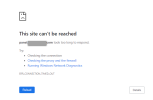
1697090716223.png
 
Last edited by a moderator:
I can successfully open the page in my Chrome here. So it is quite likely that the issue exists with your individual Chrome installation. Chrome is able to block specific ports, maybe there is a configuration issue in that setting?
 
I can successfully open the page in my Chrome here. So it is quite likely that the issue exists with your individual Chrome installation. Chrome is able to block specific ports, maybe there is a configuration issue in that setting?
Shall I re-install chrome ?
 
I can successfully open the page in my Chrome here. So it is quite likely that the issue exists with your individual Chrome installation. Chrome is able to block specific ports, maybe there is a configuration issue in that setting?
 
Back
Top