• Debian 11 is approaching its end-of-life (vendor EOL date - August 31, 2026). Plesk Obsidian 18.0.80 will be the last release to support it.
    If you are running Plesk Obsidian on Debian 11, we recommend you upgrade those servers to Debian 12 using our dist-upgrade tool.
  • We plan to deprecate and remove the support for XML RPC protocol versions earlier than 1.6.9.1 in Plesk Obsidian 18.0.82. We strongly recommend that you update all existing integrations using earlier versions of the XML RPC protocol to comply with the version 1.6.9.1 specification.

Resolved Can't access to Backup manager using root account, error message "Warning: Permission denied."

simoncsc

New Pleskian
Hello,

My VPS had been updated to latest Plesk Obsidian Version 18.0.34, I logged in as root account and tried to access Backup Manager today, the page will be redirected to home page and got an error message "Warning: Permission denied.", anyone can assist to fix this problem?
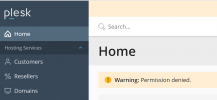
1617380228047.png

Simon
 
This can be a cache issue. Have you tried clearing your browser cache, then to reload the page?
 
I found out the solution:

Switch to Service Provider mode in CLI with:

# /usr/local/psa/bin/poweruser --off
# /usr/local/psa/bin/poweruser --on -simple false
 
Back
Top