• The APS Catalog has been deprecated and removed from all Plesk Obsidian versions.
    Applications already installed from the APS Catalog will continue working. However, Plesk will no longer provide support for APS applications.
  • Please be aware: with the Plesk Obsidian 18.0.78 release, the support for the ngx_pagespeed.so module will be deprecated and removed from the sw-nginx package.

Issue Cant delete a back up

SamH87

New Pleskian
Hi All, I have all backups going to an external source, so dont save them on the server. There is one however stuck in
  • /
  • var
  • lib
  • psa
  • dumps
  • domains
  • domain name.co.uk
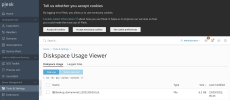
I have tried to remove it from the folder using the "delete selected" in disk space usage viewer, as well as checking the domain for any backups present, there are none. Can any one shed any light of how to remove this file?

Thanks
 

Attachments

  • Screenshot 2022-04-19 at 14.40.50 copy.png
    Screenshot 2022-04-19 at 14.40.50 copy.png
    202.4 KB · Views: 8
hello @SamH87

it may sounds naive, but did you mark this file first (on your screenshot it is not checked. this can be a reason)

also, if you have root access to the server, you can remove it using console command like
rm -f /full/path/to/file.name

p.s> to access server via SSH directly in your browser you can use our free Web SSH Plesk extension that is available in extensions catalog.
 
Back
Top