
 Facebook
 Twitter
Wordpress is loading very slow and I want to increase PHP-FPM child
I followed the instructions here and found that the domain is reaching max children
Now i'm trying to follow the instructions here. But i'm stuck at the step where I have to modify PHP-FPM settings. I double-checked here:
Service Plans > Hosting Plans > service_plan_name > PHP Settings
But I can't find PHP-FPM settings on this page..
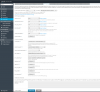
Same problem for domain's PHP settings
I followed the instructions here and found that the domain is reaching max children
Now i'm trying to follow the instructions here. But i'm stuck at the step where I have to modify PHP-FPM settings. I double-checked here:
Service Plans > Hosting Plans > service_plan_name > PHP Settings
But I can't find PHP-FPM settings on this page..
Same problem for domain's PHP settings


