• Debian 11 is approaching its end-of-life (vendor EOL date - August 31, 2026). Plesk Obsidian 18.0.80 will be the last release to support it.
    If you are running Plesk Obsidian on Debian 11, we recommend you upgrade those servers to Debian 12 using our dist-upgrade tool.
  • We plan to deprecate and remove the support for XML RPC protocol versions earlier than 1.6.9.1 in Plesk Obsidian 18.0.82. We strongly recommend that you update all existing integrations using earlier versions of the XML RPC protocol to comply with the version 1.6.9.1 specification.

Resolved can't prolongate extension license

Pavlo.UA

Basic Pleskian
Hello everybody.
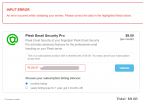
Please help to solve issue. I can't prolongate Plesk Email Security extension after it was expired already (see screenshot).

I have Plesk Obsidian 18.0.36 on CentOS Linux 7.9.2009.

Upd: I'm sure I enter the right Plesk License Key.
 

Attachments

  • Screenshot_1.png
    Screenshot_1.png
    50 KB · Views: 4
What about clicking "Retrieve Additional Key" button for this license in Plesk > Tools & Settings > License Manager?
 
What about clicking "Retrieve Additional Key" button for this license in Plesk > Tools & Settings > License Manager?

Unfortunately nothing. I mean:

Unable to update EXT.07xxxxxxxx an error occurred while processing your key. You can
try to retrieve the key manually in Plesk (Tools & Settings > License Management) or let
Plesk try to update it in the next 24 hours. If you do not want to receive this
notification any more, remove this key from Plesk.

The license key is expired. Some features can be unavailable. Please contact your hosting
provider.
 
Plesk License Support helped to me :) Case closed. I just had to update credit card data and then prolongate the subscription.
 
Back
Top