• The APS Catalog has been deprecated and removed from all Plesk Obsidian versions.
    Applications already installed from the APS Catalog will continue working. However, Plesk will no longer provide support for APS applications.
  • Please be aware: with the Plesk Obsidian 18.0.78 release, the support for the ngx_pagespeed.so module will be deprecated and removed from the sw-nginx package.

Resolved Change email password

bttman

New Pleskian
How can I change the password of an email account ? with this new update I have no option, or access to domain email accounts, is this a bug ?
 
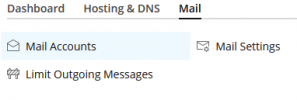
Open your subscription, then click on the "Mail" tab, select the mail account and change the password there:
1634657360131.png

Doesn't this work for you?
 
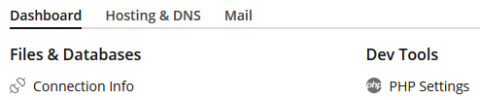
So please post a screenshot of what you see when you search for the domain, it should look roughly like this:

1634659626166.png


Now, when you click on "Mail", what do you see?
 
Can you please check this thread, it may have a solution to your problem:
 
Resolved, was this:

- In the "Mail Server Settings" item, please make sure that the checkbox "Enable mail management functions in Plesk" is checked

During the last plesk update, it unckeded this ...

tks for the help.
 
Back
Top