• Inviting everyone who uses WordPress management tools in Plesk
    The Plesk team is conducting a 60-minute research session that includes an interview and a moderated usability test.
    To participate, please use this link .
    Your experience will help shape product decisions and ensure the tools better support real-world use cases.

Question Clarification on Disabling Automatic Updates, Manual Updates, and Rollback Procedure in Plesk

Thomas Oryon

Regular Pleskian
Server operating system version
Redhat linux 9
Plesk version and microupdate number
18.0.76
Hello Support,

We would like to check on the following regarding Plesk updates:
  1. How can we stop or disable automatic updates in Plesk?
  2. Once automatic updates are disabled, what is the recommended procedure to perform manual updates instead?
  3. In case an update causes any issue, is rollback possible in Plesk? If yes, kindly advise the proper rollback procedure and any prerequisites that should be prepared before performing the update.
We would appreciate it if you could also share any best practices or official recommendations for handling Plesk updates safely in a production environment.

Awaiting your reply.
 
Hi Thomas!

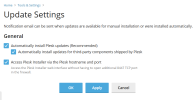
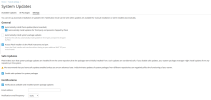
You may check these settings in Plesk > Tools & Settings > Update Settings. Depending on the option in panel.ini, you will either have something like this:
  • with
    [updates]
    systemUpdatesTool = 0
    1774521208499.png
  • without the option or with
    Code:
    [updates]
    systemUpdatesTool = 1
    1774521377695.png
In case of "Automatically install system package updates", You may later install them manually one by one.
In case of Plesk updates, you may always install them manually via Tools & Settings > Updates.
In both cases you will have the full control over when to perform the updates, e.g. not install them during the busy hours.
Note that these changes will not affect the hotfix updates behavior (the last number in the Plesk version, e.g. 18.0.76.1 is hotfixs #1) because they are considered critical, e.g. fixing some critical bug in the current version or patching a vulnerability.

As for the rollback, there is no rollback process in Plesk but the alternative would be to create a snapshot of your server if the environment is sutable (e.g. most cloud providers have a snapshot feature).
 
Back
Top