• The APS Catalog has been deprecated and removed from all Plesk Obsidian versions.
    Applications already installed from the APS Catalog will continue working. However, Plesk will no longer provide support for APS applications.
  • Please be aware: with the Plesk Obsidian 18.0.78 release, the support for the ngx_pagespeed.so module will be deprecated and removed from the sw-nginx package.

Resolved Cloudflare and plesk

alegsa

New Pleskian
Hello. Sorry my English.
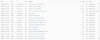
This is the log file of my website on Plesk:

logs.png

All the IPs are from Cloudflare (I use it as a proxy) and I don't know how to change this.

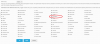
I didn't have de cloudflare module, I've installed it:

modulo.png


But the problem is still there...

Thank you
 
Last edited:
I've resolved by my own.
CENT OS 7 solution:
if you have remoteip module

nano /etc/httpd/conf.d/remoteip.conf

and add there:

RemoteIPHeader CF-Connecting-IP
RemoteIPTrustedProxy 173.245.48.0/20
RemoteIPTrustedProxy 103.21.244.0/22
RemoteIPTrustedProxy 103.22.200.0/22
RemoteIPTrustedProxy 103.31.4.0/22
RemoteIPTrustedProxy 141.101.64.0/18
RemoteIPTrustedProxy 108.162.192.0/18
RemoteIPTrustedProxy 190.93.240.0/20
RemoteIPTrustedProxy 188.114.96.0/20
RemoteIPTrustedProxy 197.234.240.0/22
RemoteIPTrustedProxy 198.41.128.0/17
RemoteIPTrustedProxy 162.158.0.0/15
RemoteIPTrustedProxy 104.16.0.0/12
RemoteIPTrustedProxy 172.64.0.0/13
RemoteIPTrustedProxy 131.0.72.0/22
RemoteIPTrustedProxy 2400:cb00::/32
RemoteIPTrustedProxy 2606:4700::/32
RemoteIPTrustedProxy 2803:f800::/32
RemoteIPTrustedProxy 2405:b500::/32
RemoteIPTrustedProxy 2405:8100::/32
RemoteIPTrustedProxy 2a06:98c0::/29
RemoteIPTrustedProxy 2c0f:f248::/32

restart Apache

and problem is solved
 
Back
Top