Facebook
 Twitter
Is there a tutorial or guide to connect to a git repository on CodeCommit.
I have an IAM account that has the right roles, I tried connecting through SSH and added the public key offered by Plesk to the IAM account.
However its not working.
In CodeCommit it does say do this step (below) but I am not sure where to do it give the Vhosts:
Edit your SSH configuration file named "config" in your local ~/.ssh directory. Add the following lines to the file, where the value for User is the SSH Key ID you copied in Step 2.
Host git-codecommit.*.amazonaws.com
User Your-IAM-SSH-Key-ID-Here
IdentityFile ~/.ssh/Your-Private-Key-File-Name-Here
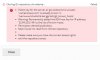
Error is attached. Any help is appreciated.
I have an IAM account that has the right roles, I tried connecting through SSH and added the public key offered by Plesk to the IAM account.
However its not working.
In CodeCommit it does say do this step (below) but I am not sure where to do it give the Vhosts:
Edit your SSH configuration file named "config" in your local ~/.ssh directory. Add the following lines to the file, where the value for User is the SSH Key ID you copied in Step 2.
Host git-codecommit.*.amazonaws.com
User Your-IAM-SSH-Key-ID-Here
IdentityFile ~/.ssh/Your-Private-Key-File-Name-Here
Error is attached. Any help is appreciated.