Facebook
 Twitter
- Server operating system version
- CentOS Linux 8.5.2111
- Plesk version and microupdate number
- Version 18.0.41
Hello,
Please I need your help Please
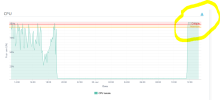
I have CPU: Critical: 100.00% saturated on my VPS.
Operating system: CentOS 8
I have 7 WordPress websites installed on my VPS, some of my websites are not working, and I can't log in to the back-end of WordPress, I can't log in to the server admin.
I have this notification: The threshold of Apache & PHP-FPM memory usage has been exceeded.
Are I m under attack?
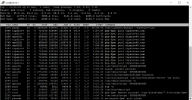
Attached photo to see my problem, I did this command on SSH: top -c
Please tell me how to back my CPU to normal, how to fix it?
Thank you so much for your help.
Please I need your help Please
I have CPU: Critical: 100.00% saturated on my VPS.
Operating system: CentOS 8
I have 7 WordPress websites installed on my VPS, some of my websites are not working, and I can't log in to the back-end of WordPress, I can't log in to the server admin.
I have this notification: The threshold of Apache & PHP-FPM memory usage has been exceeded.
Are I m under attack?
Attached photo to see my problem, I did this command on SSH: top -c
Please tell me how to back my CPU to normal, how to fix it?
Thank you so much for your help.