
 Facebook
 Twitter

cipcip
Basic Pleskian
Hi guys, I have an issue on my Plesk Onyx that the crons are not starting automatically.
If I run them manually, then is fine, no issue found. I am also not getting any errors on my e-mail.
Below is a screenshot of how I run them:
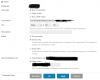
I assume that the path is not correct?
'sources' is the directory under the main domain. I chose /httpdocs/.... because that is the path when I add it as a run php script which by the way, not working as well.
Thank you in advance for your help.
If I run them manually, then is fine, no issue found. I am also not getting any errors on my e-mail.
Below is a screenshot of how I run them:
I assume that the path is not correct?
'sources' is the directory under the main domain. I chose /httpdocs/.... because that is the path when I add it as a run php script which by the way, not working as well.
Thank you in advance for your help.


