
 Facebook
 Twitter
Hi,
I'm newbie to Plesk when I run cron job for my subdomain from schedule task but I'm not able to add the correct path to my sub-domain directory in the cron command.
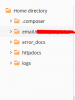
The directory structure looks like this, where email.example.com is my sub domain and in this directory my cronscript exists.
I have tried these commands, when I run these they gives this error " Could not open input file: /var/www/email.example.com/bin/console " .
/usr/bin/php -f /var/www/email.example.com/bin/console CRONTASK.
/opt/plesk/php/7.2/bin/php /var/www/vhosts/email.example.com/bin/console CRONTASK.
Any help will be appericiated.
I'm newbie to Plesk when I run cron job for my subdomain from schedule task but I'm not able to add the correct path to my sub-domain directory in the cron command.
The directory structure looks like this, where email.example.com is my sub domain and in this directory my cronscript exists.
I have tried these commands, when I run these they gives this error " Could not open input file: /var/www/email.example.com/bin/console " .
/usr/bin/php -f /var/www/email.example.com/bin/console CRONTASK.
/opt/plesk/php/7.2/bin/php /var/www/vhosts/email.example.com/bin/console CRONTASK.
Any help will be appericiated.
Last edited:
