• The new Python extension is now available. It allows customers to deploy and manage WSGI-based Python applications on their websites directly from Plesk.
  • The Plesk Mobile apps for iOS and Android and the Plesk Mobile Center extension have been deprecated, and are no longer available for new installations. In Plesk Obsidian 18.0.84, the Plesk Mobile Center extension will be removed from servers during the upgrade, and the Plesk Mobile apps will lose their server management features.
  • The Social Login extension has been deprecated and will be removed in Plesk Obsidian 18.0.84. After that, it will no longer be possible to log in to Plesk with a Google, Facebook, GitHub account, or with a passkey. Plesk usernames and passwords, as well as logging in with a WebPros Account, are not affected.

Question DDos how can i limit number of time a ip can hit the server?

raykai

Basic Pleskian
Hi im getting DDos and would need a way to block IPs after x number of requests in X amount of time.

Or is there another way of doing something to limit IPs from hitting the server?

My logs are full of ngix error such as

Code:
[alert] 27026#0: *19582 socket() failed (24: Too many open files) while connecting to upstream.
[crit] 27026#0: *12923 open() "/var/lib/nginx/proxy/4/36/0000000364" failed (24: Too many open files) while reading upstream.
27026#0: *12812 upstream timed out (110: Connection timed out) while reading response header from upstream.

Im getting so many hits that my websites are knocked offline. Any help would be appreciated.
 
Hi im getting DDos and would need a way to block IPs after x number of requests in X amount of time.

Or is there another way of doing something to limit IPs from hitting the server?

My logs are full of ngix error such as

Code:
[alert] 27026#0: *19582 socket() failed (24: Too many open files) while connecting to upstream.
[crit] 27026#0: *12923 open() "/var/lib/nginx/proxy/4/36/0000000364" failed (24: Too many open files) while reading upstream.
27026#0: *12812 upstream timed out (110: Connection timed out) while reading response header from upstream.

Im getting so many hits that my websites are knocked offline. Any help would be appreciated.

use fail2ban filter.
 
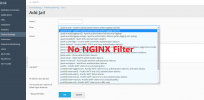
yes, I have it installed problem I have is there are no Ngnix Jails and no Ngnix Jails:
Snipaste_2021-08-20_14-03-57.png


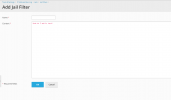
i know I can add custom filters...
Tools & Settings > IP Address Banning > Jails > Jail Filters > Add Jail Filter

Snipaste_2021-08-20_13-57-05.png

But what do I add in here to solve my problem?
 
You'll need to write your own jail filter to track requests by IP.

I would just raise the open file limit as a mitigation - you don't want your server going down from the either way. Then consider something like Cloudflare. Rate Limiting is best done as close to the client as possible.
 
Back
Top