Follow along with the video below to see how to install our site as a web app on your home screen.
Note: This feature may not be available in some browsers.
We value your experience with Plesk during 2025 Plesk strives to perform even better in 2026. To help us improve further, please answer a few questions about your experience with Plesk Obsidian 2025. Please take this short survey: https://survey.webpros.com/
How can I change the default subscription view mode.
It defaults to dynamic list and have to change it every time accessing a subscription as admin.
Plesk Obsidian Version 18.0.35 Update #1
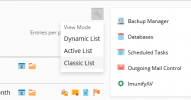
Plesk Administrator can now force all subscriptions to only use the Dynamic, Active, or Classic list by adding the following lines to the panel.ini file:
Code:
[navigation]
forceWebsiteList = dynamic (or = active, or = classic)
It is also possible to hide one or more options from the list: