
 Facebook
 Twitter
- Server operating system version
- Canonical Ubuntu 20.01 Aarch 64
- Plesk version and microupdate number
- 18.0.47
Hello,
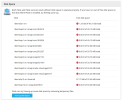
My Plesk server getting fulled automatically. Last week i deleted several files and database to free up space but again when i am getting today, it full again. I have very simple website with 100 GB of space.
I am not sure what downloading plesk which making my sever full automatically.
My Plesk server getting fulled automatically. Last week i deleted several files and database to free up space but again when i am getting today, it full again. I have very simple website with 100 GB of space.
I am not sure what downloading plesk which making my sever full automatically.


