
 Facebook
 Twitter
Quinten
Regular Pleskian
- Server operating system version
- Ubuntu 24.04.3 LTS
- Plesk version and microupdate number
- Plesk Obsidian 18.0.75
Hello,
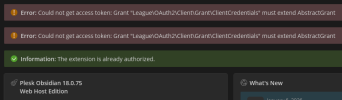
I have updated Plesk to version 18.0.75 and upgraded the Microsoft Azure DNS module to the latest release. Since then, DNS changes are no longer synchronizing. When attempting to access the application settings, the following error is displayed.
Anyone have any idea?
Kind Regards,
Quinten
I have updated Plesk to version 18.0.75 and upgraded the Microsoft Azure DNS module to the latest release. Since then, DNS changes are no longer synchronizing. When attempting to access the application settings, the following error is displayed.
Anyone have any idea?
Kind Regards,
Quinten


