Facebook
 Twitter
raykai
Basic Pleskian
Hi,
i have a persistent docker error message that i cant remove...
i deleted a container using the remove button. The box of the container got removed but its now showing a error message on all pages of plesk. even after a reboot.
Error: {"message":"No such container: c6e664c7f9ee73619ba37a4737dfb878c9ee5aad8efa86584214a087d8c2486e"}
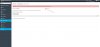
how can remove this error message ?
Spec:
vps
OS: Ubuntu 16.04.2 LTS
Product: Plesk Onyx 17.0.17 Update #21 ,
i have a persistent docker error message that i cant remove...
i deleted a container using the remove button. The box of the container got removed but its now showing a error message on all pages of plesk. even after a reboot.
Error: {"message":"No such container: c6e664c7f9ee73619ba37a4737dfb878c9ee5aad8efa86584214a087d8c2486e"}
how can remove this error message ?
Spec:
vps
OS: Ubuntu 16.04.2 LTS
Product: Plesk Onyx 17.0.17 Update #21 ,