• Debian 11 is approaching its end-of-life (vendor EOL date - August 31, 2026). Plesk Obsidian 18.0.80 will be the last release to support it.
    If you are running Plesk Obsidian on Debian 11, we recommend you upgrade those servers to Debian 12 using our dist-upgrade tool.
  • We plan to deprecate and remove the support for XML RPC protocol versions earlier than 1.6.9.1 in Plesk Obsidian 18.0.82. We strongly recommend that you update all existing integrations using earlier versions of the XML RPC protocol to comply with the version 1.6.9.1 specification.

Resolved Empty EMail notifications

skellenb

New Pleskian
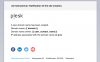
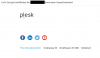
After upgrade to Plesk Obsidian, the Email notifications look pretty nice, but are absolutely useless, because there is no content of what has been done (or could not be done)

All i get is Header(with Plesk Logo) and Footer with Social Icons but no Content.

How can this be fixed?
 
Hi @skellenb,

Please check the notification settings set in Tools&Settings -> Plesk -> Notifications -> _notification_name_. This is email notifications templates and usually, they are not empty. Plesk Admin is able to customize these templates as desired.
Screenshot - 2019-10-06T193226.226.png Screenshot - 2019-10-06T193245.755.png
 
i checked all the settings and set it to default.
Still the same when receiving notification Emails from Let's Encrypt or SSL-It!
 

Attachments

  • 06-10-_2019_19-07-58.png
    06-10-_2019_19-07-58.png
    17.4 KB · Views: 7
Back
Top