• The APS Catalog has been deprecated and removed from all Plesk Obsidian versions.
    Applications already installed from the APS Catalog will continue working. However, Plesk will no longer provide support for APS applications.
  • Please be aware: with the Plesk Obsidian 18.0.78 release, the support for the ngx_pagespeed.so module will be deprecated and removed from the sw-nginx package.

Enable IPv6 for Subscription?

repa

New Pleskian
Hi,

i have added IPv6 support to my Ubuntu 12.04 server with plesk 11 installed.

now, i assigned an ip address to my reseller plan. Each time, a new subscription is created, the customer gets the ipv4 address assigned, but not the ipv6 address.

how can i enable ipv6 by default?
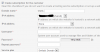
 
Why is this IPv6 entry "None" by default? How can i set the default address?
 

Attachments

  • Capture.PNG
    Capture.PNG
    26.7 KB · Views: 17
If I correctly understood you have assigned one shared IPv4 and one IPv6 address to Reseller's Service Plan and you need that IPv6 address should be selected by default when you create subscription?
 
Right, i have one IPv4 and one IPv6 assigned to a REseller Plan, IPv4 is selected, IPv6 not.
 
Sorry, no any hint. I have tried to find any solution and seems this behaviour is hardcoded.
 
Perhaps corresponding API-RPC XML requests can be considered as possible solution?
 
Back
Top