• Debian 11 is approaching its end-of-life (vendor EOL date - August 31, 2026). Plesk Obsidian 18.0.80 will be the last release to support it.
    If you are running Plesk Obsidian on Debian 11, we recommend you upgrade those servers to Debian 12 using our dist-upgrade tool.
  • We plan to deprecate and remove the support for XML RPC protocol versions earlier than 1.6.9.1 in Plesk Obsidian 18.0.82. We strongly recommend that you update all existing integrations using earlier versions of the XML RPC protocol to comply with the version 1.6.9.1 specification.

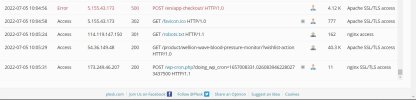
Issue error 500 post http 1.0

duaatahli

New Pleskian
Server operating system version
Ubuntu 20.04.4 LTS
Plesk version and microupdate number
Plesk Obsidian 18.0.44 Update #3,
Hello

I'm running wordpress website and application
when I proceed to checkout, the checkout keeps loading and I got this error in log

How to solve this please?

DateTypeIPCodeMessageRAgentSizeSource
2022-07-05 10:24:33Error5.155.43.173500POST /en/app-checkout/ HTTP/1.0
Mozilla/5.0 (Linux; Android 10; SM-A750F Build/QP1A.190711.020; wv) AppleWebKit/537.36 (KHTML, like Gecko) Version/4.0 Chrome/103.0.5060.70 Mobile Safari/537.36
4.12 KApache SSL/TLS access
 

Attachments

  • SharedScreenshot.jpg
    SharedScreenshot.jpg
    108.4 KB · Views: 13
Can you open the browser console and check the errors and XHR requests?
In Firefox: Tools -> Browser Tools -> Web Developer Tools

Also, check if there are errors in the Web Application Firewall:
Subscription -> Web Application Firewall -> Error Log File
 
The problem in the mobile android application
when I proceed to checkout page in the mobile app, it keeps loading and I got the error message in the website log
The errors in the Web Application Firewall:


2022-05-24 07:43:55Error51.91.27.115AH01276: Cannot serve directory /var/www/vhosts/bluepharma.store/httpdocs/wp-content/plugins/woocommerce-checkout-field-editor/dist/js/: No matching DirectoryIndex (index.html,index.cgi,index.pl,index.php,index.xhtml,index.htm,index.shtml) found, and server-generated directory index forbidden by Options directive
2022-05-24 07:43:55Error51.91.27.115AH01276: Cannot serve directory /var/www/vhosts/bluepharma.store/httpdocs/wp-content/plugins/woocommerce-checkout-field-editor/dist/: No matching DirectoryIndex (index.html,index.cgi,index.pl,index.php,index.xhtml,index.htm,index.shtml) found, and server-generated directory index forbidden by Options directive
 
Please check if there are errors in the Web Application Firewall when you open the checkout page in the mobile app:

Subscription -> Web Application Firewall -> Error Log File
 
The problem in the mobile android application
when I proceed to checkout page in the mobile app, it keeps loading and I got the error message in the website log
The errors in the Web Application Firewall:


2022-05-24 07:43:55Error51.91.27.115AH01276: Cannot serve directory /var/www/vhosts/bluepharma.store/httpdocs/wp-content/plugins/woocommerce-checkout-field-editor/dist/js/: No matching DirectoryIndex (index.html,index.cgi,index.pl,index.php,index.xhtml,index.htm,index.shtml) found, and server-generated directory index forbidden by Options directive
2022-05-24 07:43:55Error51.91.27.115AH01276: Cannot serve directory /var/www/vhosts/bluepharma.store/httpdocs/wp-content/plugins/woocommerce-checkout-field-editor/dist/: No matching DirectoryIndex (index.html,index.cgi,index.pl,index.php,index.xhtml,index.htm,index.shtml) found, and server-generated directory index forbidden by Options directive
Then check where you open those URLs in your mobile app and fix those URLs to point to an actual file, not a directory.
 
Back
Top