• Debian 11 is approaching its end-of-life (vendor EOL date - August 31, 2026). Plesk Obsidian 18.0.80 will be the last release to support it.
    If you are running Plesk Obsidian on Debian 11, we recommend you upgrade those servers to Debian 12 using our dist-upgrade tool.
  • We plan to deprecate and remove the support for XML RPC protocol versions earlier than 1.6.9.1 in Plesk Obsidian 18.0.82. We strongly recommend that you update all existing integrations using earlier versions of the XML RPC protocol to comply with the version 1.6.9.1 specification.

Resolved ERROR: Declaration of PleskSslIt\GuzzleHttp\Psr7\Uri::getScheme() must be compatible with Psr\Http\Message\UriInterface::getScheme(): string (Uri.php:

JeromeAlexandre

New Pleskian
Server operating system version
CentOS Linux 7.9.2009 (Core)
Plesk version and microupdate number
Plesk Obsidian v18.0.61_build1800240603.06 os_CentOS 7
Hello, today for the first time I get this message when clicking on any of the links to the SSLit! extension :

ERROR: Declaration of PleskSslIt\GuzzleHttp\Psr7\Uri::getScheme() must be compatible with Psr\Http\Message\UriInterface::getScheme(): string (Uri.php:346)

I cannot manage my certificates.

I removed the Let's Encrypt extension to make sure there is no incompatibility, but that's done nothing.

Please help.
 
To solve the issue, install the new version of SSL It! Or if auto-update is enabled for extensions, it will be installed automatically during the next 24h.

Changes​

1.15.1 (17 June 2024)​

  • [-] Opening the SSL It! page of a domain no longer fails with the "Declaration of PleskSslIt\GuzzleHttp\Psr7\Uri::getScheme() must be compatible with Psr\Http\Message\UriInterface::getScheme(): string" error. (EXTSSLIT-2096)
 
To solve the issue, install the new version of SSL It! Or if auto-update is enabled for extensions, it will be installed automatically during the next 24h.
Plesk Obsidian 18.0.61 Update #5
Ubuntu 20.04.6 LTS
SSL It! Version: 1.15.2-3490

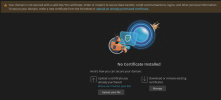
After i had many errors yesterday, today i can see ssl renew screen but i dont get new cert but a prompt to upload .pem file - result is unsecured domain.
1718714338430.png
 
Back
Top