• The APS Catalog has been deprecated and removed from all Plesk Obsidian versions.
    Applications already installed from the APS Catalog will continue working. However, Plesk will no longer provide support for APS applications.
  • Please be aware: with the Plesk Obsidian 18.0.78 release, the support for the ngx_pagespeed.so module will be deprecated and removed from the sw-nginx package.

Resolved Error on update Server-wide Settings

BrinsleyP

Regular Pleskian
Server operating system version
Ubuntu 22 LTS
Plesk version and microupdate number
18.0.44 U1
Hello to all...

When i try edit Server-wide Settings always get a error. Just work fine only i click in USE DEFAULT SETTINGS
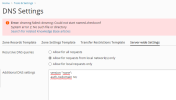
1.png

So how to fix this to work when edit this config?
 
Make sure that this CLI utility exists on your server:

# ll /usr/sbin/named-checkconf
-rwxr-xr-x 1 root root 39328 Mar 15 14:11 /usr/sbin/named-checkconf*

It is a part of bind9-utils package:

# dpkg -S /usr/sbin/named-checkconf
bind9-utils: /usr/sbin/named-checkconf

Install it with apt if this package is not installed for some reason.
 
Make sure that this CLI utility exists on your server:

# ll /usr/sbin/named-checkconf
-rwxr-xr-x 1 root root 39328 Mar 15 14:11 /usr/sbin/named-checkconf*

It is a part of bind9-utils package:

# dpkg -S /usr/sbin/named-checkconf
bind9-utils: /usr/sbin/named-checkconf

Install it with apt if this package is not installed for some reason.
Hello,
I try verify, but in this ubuntu 22 dont apear runs fine.
root@server ~ # /usr/sbin/named-checkconf
-bash: /usr/sbin/named-checkconf: No such file or directory
root@server ~ # dpkg -S /usr/sbin/named-checkconf
dpkg-query: no path found matching pattern /usr/sbin/named-checkconf
root@server ~ #
 
Have you installed bind9-utils package?
yes :)
root@server ~ # apt install -y bind9-utils
Reading package lists... Done
Building dependency tree... Done
Reading state information... Done
bind9-utils is already the newest version (1:9.18.1-1ubuntu1.1).
0 upgraded, 0 newly installed, 0 to remove and 0 not upgraded.
root@server ~ #
 
What about

# dpkg-query -L bind9-utils | grep named-checkconf

?
 
Strange, on Ubuntu 20.04 it is

/usr/sbin/named-checkconf

# dpkg-query -L bind9-utils | grep named-checkconf
/usr/sbin/named-checkconf
/usr/share/man/man8/named-checkconf.8.gz

I'm not sure but try to create symlink from your /usr/bin/named-checkconf to /usr/sbin/named-checkconf
I hope it will help.
 
Strange, on Ubuntu 20.04 it is

/usr/sbin/named-checkconf

# dpkg-query -L bind9-utils | grep named-checkconf
/usr/sbin/named-checkconf
/usr/share/man/man8/named-checkconf.8.gz

I'm not sure but try to create symlink from your /usr/bin/named-checkconf to /usr/sbin/named-checkconf
I hope it will help.
Its works!!! Thank You :D
 
Back
Top