
 Facebook
 Twitter
Compi
Basic Pleskian
Hello!
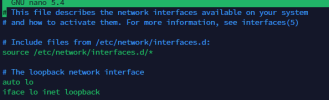
My /etc/network/interfaces look really weird, at least not what I'm used to. Is this normal with Plesk? Everything works.
I've discovered this because I changed the IP of the server using this guide: How to change the IP address in Plesk for Linux - Support Cases from Plesk Knowledge Base
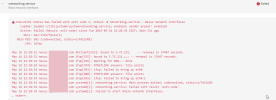
After I was done, the networking service didn't come up:
I copied the configuration seen in the first screenshot into the server after the IPs were changed because some entries were added. It now works fine, I just wanna know if this is normal.
My /etc/network/interfaces look really weird, at least not what I'm used to. Is this normal with Plesk? Everything works.
I've discovered this because I changed the IP of the server using this guide: How to change the IP address in Plesk for Linux - Support Cases from Plesk Knowledge Base
After I was done, the networking service didn't come up:
I copied the configuration seen in the first screenshot into the server after the IPs were changed because some entries were added. It now works fine, I just wanna know if this is normal.


