• The APS Catalog has been deprecated and removed from all Plesk Obsidian versions.
    Applications already installed from the APS Catalog will continue working. However, Plesk will no longer provide support for APS applications.
  • Please be aware: with the Plesk Obsidian 18.0.78 release, the support for the ngx_pagespeed.so module will be deprecated and removed from the sw-nginx package.

Resolved Execute cronjob as system user?

hillcow

New Pleskian
Please help me understand system users in Plesk. The system user of my website is called "Frankenstein". In the file manager I can see that the folders have permissions set for Frankenstein and the group "psacln". Now the problem is that I need to have a cronjob that is executed by Frankenstein, because this cronjob is creating files in this directory and if it's created by the root user I run into permission errors. However, I cannot figure out how to add a cronjob as "Frankenstein" or "psacln", both are not in my list (logged into Plesk as root).
How do I run a cronjob as a system user? Thanks!

Also, I use PHP-FPM. Who is the user that executes the code? It's the system user right?
 
PHP-FPM runs your scripts as the subscription owner (=in your words "system user").

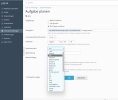
A cronjob created from within a subscription is executed using the permissions of the subscription owner. A cronjob created in your admin login runs as root by default, but here you can select a different user, too.
 
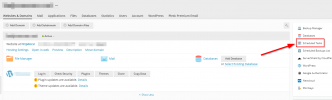
Okay, I finally found the solution. The only way to create a cronjob as a system user is to use the search function. The UI has no other way to find this second "Scheduler" page, which is, like you said, within a subscription. This is really really bad UX. Or - possibly I'm too stupid :D
 
PHP-FPM runs your scripts as the subscription owner (=in your words "system user").

A cronjob created from within a subscription is executed using the permissions of the subscription owner. A cronjob created in your admin login runs as root by default, but here you can select a different user, too.

I have the same problem. Which user is the "system user"? I can't find the domain-user.

1652524698536.jpg
 
Apparently are settings in Tools$Setting>>cronjobs only for plesk himself? The solution is to add a cronjob by domain. Unfortunately, shows domain-cronjobs options for each domain only in dynamic view.

close close
 
Back
Top