• Debian 11 is approaching its end-of-life (vendor EOL date - August 31, 2026). Plesk Obsidian 18.0.80 will be the last release to support it.
    If you are running Plesk Obsidian on Debian 11, we recommend you upgrade those servers to Debian 12 using our dist-upgrade tool.
  • We plan to deprecate and remove the support for XML RPC protocol versions earlier than 1.6.9.1 in Plesk Obsidian 18.0.82. We strongly recommend that you update all existing integrations using earlier versions of the XML RPC protocol to comply with the version 1.6.9.1 specification.

Question Fail2Ban settings missing in Obsidian 18.0.48 for Windows

Johan Donne

New Pleskian
Server operating system version
Windows Server 2016
Plesk version and microupdate number
Obsidian Web Pro 18.0.48
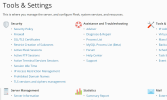
In 'Tools & Settings', the link for Fail2Ban settings seems to have disappeared.
Does anyone know why (or how to reach those settings)?
 

Attachments

  • Tools & Settings.png
    Tools & Settings.png
    132 KB · Views: 6
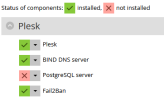
Fail2Ban is no longer in the list of components...
Tough it seems to be active: all connections coming from our reverse proxy are refused (In a previous version I whitelisted that IP-address).
Connections from other machines are working.
 
I would say remove it and reinstall it but i am only experienced with Linux and not windows server (i only just noticed that you are on windows)

Edit: it seems that fail2ban is not available on windows. Thanks Kaspar!
 
Ok, then I must be mistaken (I remember whitelisting our reverse proxy in Fail2Ban, but that must have been on a Linux-machine).
Still very strange: that plesk server resets all requests coming from the reverse proxy and accepts them from all other machines.
None of the existing firewall rules could explain that behavior...
 
Back
Top