
 Facebook
 Twitter
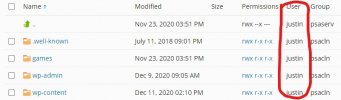
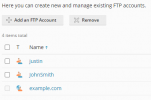
After using the Plesk Migrator Extension to move some domains to another server I noticed that on all of those domain the "file user" had changed. Instead of the system user who set in the "Web Hosting Access" the files are assigned to a different FTP user.
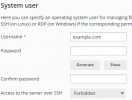
I am able to "fix" this by changing the system user credentials in the "Web Hosting Access", however this requires to also change the system user password. Which I rather not do. Any suggestions on how to restore the file user, preferably without the domains being offline?
I hope I am explaining this right. Some screen shots to illustrate the issue.
I am able to "fix" this by changing the system user credentials in the "Web Hosting Access", however this requires to also change the system user password. Which I rather not do. Any suggestions on how to restore the file user, preferably without the domains being offline?
I hope I am explaining this right. Some screen shots to illustrate the issue.


