
 Facebook
 Twitter
Username:
TITLE
Filter indicator on log browser stays on fixed position when scrolling
PRODUCT, VERSION, OPERATING SYSTEM, ARCHITECTURE
Plesk: .77
Log browser: 1.9.18-11077
PROBLEM DESCRIPTION
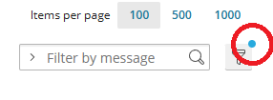
I came across this minor UI issue on the log browser when applying a filter. The little indicator dot on the filter button for the log browser extension stays on a fixed position when scrolling down the page (if there are enough log items to scroll trough).
STEPS TO REPRODUCE
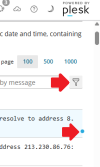
Open the log browser go to any of the tabs other than the "Overview" tab. Click the filter icon and select any filter that will leave you with enough log items to scroll trough. Scroll down the page to see that the little indicator dot says at the same screen position.
ACTUAL RESULT
Indicator dot on the filter button stays at fixed screen position when scrolling the page.
EXPECTED RESULT
Indicator dot on the filter button stays positioned on button.
YOUR EXPECTATIONS FROM PLESK SERVICE TEAM
Confirm bug
TITLE
Filter indicator on log browser stays on fixed position when scrolling
PRODUCT, VERSION, OPERATING SYSTEM, ARCHITECTURE
Plesk: .77
Log browser: 1.9.18-11077
PROBLEM DESCRIPTION
I came across this minor UI issue on the log browser when applying a filter. The little indicator dot on the filter button for the log browser extension stays on a fixed position when scrolling down the page (if there are enough log items to scroll trough).
STEPS TO REPRODUCE
Open the log browser go to any of the tabs other than the "Overview" tab. Click the filter icon and select any filter that will leave you with enough log items to scroll trough. Scroll down the page to see that the little indicator dot says at the same screen position.
ACTUAL RESULT
Indicator dot on the filter button stays at fixed screen position when scrolling the page.
EXPECTED RESULT
Indicator dot on the filter button stays positioned on button.
YOUR EXPECTATIONS FROM PLESK SERVICE TEAM
Confirm bug
Last edited:


