Follow along with the video below to see how to install our site as a web app on your home screen.
Note: This feature may not be available in some browsers.
The APS Catalog has been deprecated and removed from all Plesk Obsidian versions. Applications already installed from the APS Catalog will continue working. However, Plesk will no longer provide support for APS applications.
Please be aware: with the Plesk Obsidian 18.0.78 release, the support for the ngx_pagespeed.so module will be deprecated and removed from the sw-nginx package.
Although the firewall has rules for port 22 "Allow incoming from all" I don't have access to SSH with putty.
If I disable the firewall, access is allowed instead.
This is the screenshot.
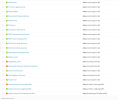
My problem is with the firewall, not with Failban.
However, I have no Banned IP and my static IP is in Trusted IP.
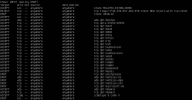
Obviously with the firewall activated I can't run the command because I can't access the server.
I ran it on the console of the VPS, but I can't copy its contents there.
This is a screenshot.
It's a really strange thing.
Last night I created two VPS by setting them up at the same time using the same commands on both putty sessions.
Everything worked without errors and I finally shut down both.
This morning, I turn them back on, one works and the other doesn't.
Maybe it's better if I reset the VPS and install it again.