Follow along with the video below to see how to install our site as a web app on your home screen.
Note: This feature may not be available in some browsers.
We value your experience with Plesk during 2025 Plesk strives to perform even better in 2026. To help us improve further, please answer a few questions about your experience with Plesk Obsidian 2025. Please take this short survey: https://survey.webpros.com/
On Plesk for Linux mod_status is disabled on upgrades to improve Apache security. This is a one-time operation that occurs during an upgrade. You can manually enable mod_status later if needed.
Although the firewall has rules for port 22 "Allow incoming from all" I don't have access to SSH with putty.
If I disable the firewall, access is allowed instead.
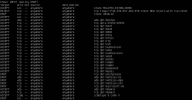
This is the screenshot.
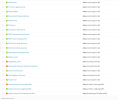
My problem is with the firewall, not with Failban.
However, I have no Banned IP and my static IP is in Trusted IP.
Obviously with the firewall activated I can't run the command because I can't access the server.
I ran it on the console of the VPS, but I can't copy its contents there.
This is a screenshot.
It's a really strange thing.
Last night I created two VPS by setting them up at the same time using the same commands on both putty sessions.
Everything worked without errors and I finally shut down both.
This morning, I turn them back on, one works and the other doesn't.
Maybe it's better if I reset the VPS and install it again.