• Debian 11 is approaching its end-of-life (vendor EOL date - August 31, 2026). Plesk Obsidian 18.0.80 will be the last release to support it.
    If you are running Plesk Obsidian on Debian 11, we recommend you upgrade those servers to Debian 12 using our dist-upgrade tool.
  • We plan to deprecate and remove the support for XML RPC protocol versions earlier than 1.6.9.1 in Plesk Obsidian 18.0.82. We strongly recommend that you update all existing integrations using earlier versions of the XML RPC protocol to comply with the version 1.6.9.1 specification.

Issue Firewall rule for RDP not being applied

SusanJ

New Pleskian
Server operating system version
Windows Server 2019
Plesk version and microupdate number
Plesk Obsidian Web Host Edition 18.0.49 Update #2
Plesk Obsidian: I am trying to use the Firewall Rule to turn off RDP. When I go to Tools->Firewall--General. Firewall Protection is 'checked" on Firewall status is On. Under Firewall Rules I unchecked Remote Desktop. However I can still access the Windows 2019 server with RDP. I don't want to remove RDP access totally since occasionally I may need to access the server with RDP. I was hoping I could turn it on and off via the Plesk Firewall Rules.
Thanks
Susan
 
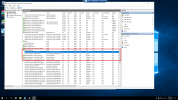
Pleask creates new rules on setup, meaning the original remote desktop rule is still there. You would want to disable those original rules
1674122585329.png
Only the ones that doesn't say "plesk" for the group you would need to disable it.
 
Yes, Plesk will create the new rules once it's installed.. You can disable the default rules as they will not be disabled automatically and make sure to update the firewall rules in both inbound and outbound.
 
Back
Top