
 Facebook
 Twitter
Hello everyone!
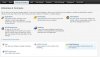
I've encountered a curious problem. Fresh install of Plesk 11 on a Windows 2008 R2 Server. If I want to configure FTP-Accounts under "Domain&Mail" the option is missing entirely. The Server is running an FTP Server and I can connect via FTP to some parts with some users I have created in Plesk. I've scrounged the internet for information about what might be going on here but came up empty.
tl;dr: There is no option to configure FTP Accounts or anything FTP in Plesk. There is empty space where the link should be.
Thanks for your help in advance.
I've encountered a curious problem. Fresh install of Plesk 11 on a Windows 2008 R2 Server. If I want to configure FTP-Accounts under "Domain&Mail" the option is missing entirely. The Server is running an FTP Server and I can connect via FTP to some parts with some users I have created in Plesk. I've scrounged the internet for information about what might be going on here but came up empty.
tl;dr: There is no option to configure FTP Accounts or anything FTP in Plesk. There is empty space where the link should be.
Thanks for your help in advance.


