• The APS Catalog has been deprecated and removed from all Plesk Obsidian versions.
    Applications already installed from the APS Catalog will continue working. However, Plesk will no longer provide support for APS applications.
  • Please be aware: with the Plesk Obsidian 18.0.78 release, the support for the ngx_pagespeed.so module will be deprecated and removed from the sw-nginx package.

Question goAccess in 18.0.77

JulianDot

Regular Pleskian
Server operating system version
AlmaLinux 10
Plesk version and microupdate number
18.0.77
In 18.0.77 it is mentioned goAccess
How to access it ? Or need to be installed separately?
(Plesk for Linux, except for CentOS 7 and CloudLinux 7) Introduced the support for a new web statistics tool for your websites, GoAccess. It is an open source web log analyzer and interactive viewer that delivers fast, actionable HTTP statistics and visual server reports, making it easy to monitor traffic, detect anomalies, and troubleshoot issues. Learn more about GoAccess.
 
Yes you need to install it by going to Tools & Settings > Plesk > Upgrade > Modify, it'll be under the Web Hosting section. Once installed you can then activate it on a domain.
 
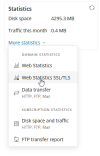
@JulianDot , you can change the statistics tool for a domain from Domains > example.com > Hosting & DNS > Hosting > Web statistics > Tool or for a service plan from Service plans > example plan > Hosting Parameters > Web statistics.
 
@JulianDot , you can change the statistics tool for a domain from Domains > example.com > Hosting & DNS > Hosting > Web statistics > Tool or for a service plan from Service plans > example plan > Hosting Parameters > Web statistics.
I already did that .

I still don't know where i can see those statistics, at which URL
 
OH
I never used awstats or webalizer from Plesk ...

Anyway , i am getting error 500 when I acces the "plesk-stat/webstat-ssl/" URL on the domain
ModSecurity: Output filter: Content-Length (2242972) over the limit (1048576)
that's the cause of error 500
 
I would strongly recommend listing all theoretically available tools in the “Web statistics” selection box. Tools that are not yet installed should be shown in a disabled state and labeled with “(needs installation)”.

Additionally, it might be helpful to include a link to a knowledge base article next to the selection box. It wasn’t clear to me that these tools need to be installed first, nor that this option even exists unless you already know about it.
 
ModSecurity tripped for us too, looks like it downloads the font in the page code? So presumably will affect all sites?

Is there a way to change the date range?
 
...IOW the "Retain web and traffic statistics for ___ months" setting is deprecated? I'm not even finding where to change that, other than the service plan.
 
@SteveITS , the server-wide setting is under Tools & Settings > Server Settings > Retain web and traffic statistics for. I will ask our team to review the article, which I am assuming is causing the confusion.
 
@Sebahat.hadzhi After installation of GoAccess on a Plesk default installation we also see the 500 internal error page when opening /plesk-stat statistics. I had to add
Code:
<IfModule mod_security2.c>
    SecResponseBodyLimit 268435456
</IfModule>
to the Apache directives of the subscription to solve it. So obviously, it does not work out of the box.

We cannot possible add custom configurations for each existing subscription. What is the correct server-wide solution so that GoAccess works for existing subscriptions?
 
Hi, Peter. Could you please try adding SecResponseBodyLimit 268435456 in Tools & settings > Web Application Firewall (ModSecurity) > Settings > Custom directives?
 
I understand that increasing SecResponseBodyLimit fixes the issue technically, but why is setting it globally to 256 MB considered the recommended approach?

Since this value applies globally (for each page request) to ModSecurity response inspection, couldn't this become a memory/performance bottleneck under load if many requests are processed simultaneously?

I use excluding /plesk-stat/ via:
<Location "/plesk-stat/">
SecRuleEngine Off
</Location>
Since /plesk-stat/ is password protected anyway, is there any particular reason ModSecurity inspection is required there at all?
 
Back
Top