
 Facebook
 Twitter
- Server operating system version
- almalinux
- Plesk version and microupdate number
- obsidian
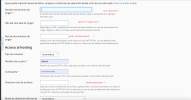
Hello my friends i need a bit help on import a site i dont know well how to fill the image i attach here.
when i connect using ssh its connect and i do this command :
$ ls
this show me this structure:
$ site.com_folder. site2_folder public_html
i want to connect on folder public_html
Thanks you very much
when i connect using ssh its connect and i do this command :
$ ls
this show me this structure:
$ site.com_folder. site2_folder public_html
i want to connect on folder public_html
Thanks you very much


