• Halloween is coming! To celebrate the occasion, we dusted off a couple of old skins, and even created a brand new one (Pixel).
    To get into the festive spirit, install the Skins extension.
  • The new Python extension is now available. It allows customers to deploy and manage WSGI-based Python applications on their websites directly from Plesk.
  • The Plesk Mobile apps for iOS and Android and the Plesk Mobile Center extension have been deprecated, and are no longer available for new installations. In Plesk Obsidian 18.0.84, the Plesk Mobile Center extension will be removed from servers during the upgrade, and the Plesk Mobile apps will lose their server management features.
  • The Social Login extension has been deprecated and will be removed in Plesk Obsidian 18.0.84. After that, it will no longer be possible to log in to Plesk with a Google, Facebook, GitHub account, or with a passkey. Plesk usernames and passwords, as well as logging in with a WebPros Account, are not affected.

Question Hide Send email option for Password reset

Thomas Oryon

Regular Pleskian
Server operating system version
Redhat linux
Plesk version and microupdate number
18.0.73
Hello Support,

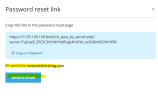
I would like to ask for assistance regarding the “Show link” dialog that appears when editing a customer’s login information. In this dialog, two options are shown:

  1. Copy link
  2. Send email
For our workflow and security policy, we need to hide only the “Send email” option, while keeping the “Copy link” option available.

Could you please let us know Is there any supported method to hide only the “Send email” button and email ID?

If available, please let us know how to do the setup.

Awaiting your reply.
 

Attachments

  • Screenshot 2025-11-20 0946491.png
    Screenshot 2025-11-20 0946491.png
    30.8 KB · Views: 7
There is no option available in Plesk to hide or disable the password “Send email” feature.

As a workaround you could develop your own custom Plesk extension to load a custom CSS to hide the button that way for example.

Plesk extension development documentation can be found here.
There is an example extension that you can download here to start your development.
 
Back
Top