• Debian 11 is approaching its end-of-life (vendor EOL date - August 31, 2026). Plesk Obsidian 18.0.80 will be the last release to support it.
    If you are running Plesk Obsidian on Debian 11, we recommend you upgrade those servers to Debian 12 using our dist-upgrade tool.
  • We plan to deprecate and remove the support for XML RPC protocol versions earlier than 1.6.9.1 in Plesk Obsidian 18.0.82. We strongly recommend that you update all existing integrations using earlier versions of the XML RPC protocol to comply with the version 1.6.9.1 specification.

Resolved High memory usage

macadia

Basic Pleskian
Server operating system version
AlmaLinux 8.10 (Cerulean Leopard)
Plesk version and microupdate number
Plesk Obsidian v18.0.67_build1800250205.19 os_RedHat el8
Hi, I have a little problem with the memory usage of my VPS...

As you can see, the first capture indicates only about 300M of free memory

1739439454525.png

But the process list show several different information...
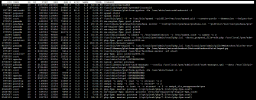
1739439545544.png

What could be going on? Is it time to restart the server?

Thanks
Martín
 
I am sure you installed some security updates (like kernel updates) during the past 1.5 years that require a server restart, so it makes sense to reboot the server :) (or do you use some Kernel live patches?)

Based on the first screenshot, the server does not use swap (1GB) and uses 1.6Gb for buffers/caches (which could be quickly freed if required), which means there is enough memory. In this case, I would say if you see low free memory, it means the kernel uses it effectively and the memory does not idle.
 
Back
Top