• The new Python extension is now available. It allows customers to deploy and manage WSGI-based Python applications on their websites directly from Plesk.
  • The Plesk Mobile apps for iOS and Android and the Plesk Mobile Center extension have been deprecated, and are no longer available for new installations. In Plesk Obsidian 18.0.84, the Plesk Mobile Center extension will be removed from servers during the upgrade, and the Plesk Mobile apps will lose their server management features.
  • The Social Login extension has been deprecated and will be removed in Plesk Obsidian 18.0.84. After that, it will no longer be possible to log in to Plesk with a Google, Facebook, GitHub account, or with a passkey. Plesk usernames and passwords, as well as logging in with a WebPros Account, are not affected.

Resolved How can I adjust HSTS in Plesk?

?????

www and non-www has HSTS NOT enabled

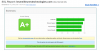
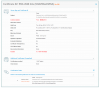
Well, IF this would have been the case, could you pls. explain these screenshots?

SSL-Test_www.lesmeilleurestechnologies.com.png​

​
SSL-Test_lesmeilleurestechnologies.com.png


Consider to rebuild your domain - specific configuration files with for example:

plesk repair web lesmeilleurestechnologies.com

or/and

plesk repair web​


In addition, pls. be informed, that you still use the standard "default" Plesk - certificate for your IP. Pls. change this, due to the fact, that your IP "164.132.149.191" reverses to "lesmeilleurestechnologies.com". ( => "Home > Tools & Settings > IP addresses" )
You are able to see this as well, with the test "https://www.ssllabs.com/ssltest/analyze.html?d=www.lesmeilleurestechnologies.com" ( open the additional hidden part "Certificate #2", or see the next screenshot as confirmation! )

SSL-Test_lesmeilleurestechnologies.com_IP.png
​


In addition, pls. be informed, that you still use the standard "default" Plesk - certificate for your IP. Pls. change this, due to the fact, that your IP "164.132.149.191" reverses to "lesmeilleurestechnologies.com". ( => "Home > Tools & Settings > IP addresses" )
You are able to see this as well, with the test "https://www.ssllabs.com/ssltest/analyze.html?d=www.lesmeilleurestechnologies.com" ( open the additional hidden part "Certificate #2", or see the next screenshot as confirmation! )


Good evening :)

I corrected for the ip

new test ssl :

https://www.ssllabs.com/ssltest/analyze.html?d=lesmeilleurestechnologies.com
https://www.ssllabs.com/ssltest/analyze.html?d=www.lesmeilleurestechnologies.com
 
Back
Top