• The APS Catalog has been deprecated and removed from all Plesk Obsidian versions.
    Applications already installed from the APS Catalog will continue working. However, Plesk will no longer provide support for APS applications.
  • Please be aware: with the Plesk Obsidian 18.0.78 release, the support for the ngx_pagespeed.so module will be deprecated and removed from the sw-nginx package.

Question How can I tell what type of RAM I need for the six websites on my server?

Colonel36

Basic Pleskian
Server operating system version
Ubuntu 20.04
Plesk version and microupdate number
Plesk Obsidian18.0.57
Hi.
I think the VPS server I have is maybe too much, I want to know wheter I could downgrade the RAM, but I don't want the server to fail.
Is there a way to check how much I need and wheter or not I can downgrade?
Many thanks
 
No, I meant the free command on the Linux console when your server is under heavy load.

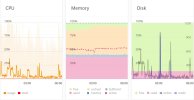
Anyway, according to the Graphana charts, you can reduce your RAM to 3/4 of your current setup. Example: If your system has 4 GB RAM, you could reduce to 3 GB, but not less. If you reduce it by more than 25% it is very likely that your system will become considerably slower, because at times it will need to swap RAM. If it was my own system, I'd not reduce RAM at all.
 
Back
Top