
 Facebook
 Twitter
David - ECA
New Pleskian
Hello,
I am preparing to migrate from my old Plesk server to Plesk Obsidian.
The Cloudflare extension is no longer available. Also, I would like to remove it from the old server before the migration to make sure everything is going well.
The problem is, I can't figure out how to turn off cloudflare on my domains. If I go to "ServerShield by Cloudflare" I just get this screen:
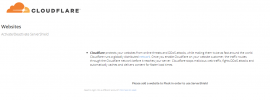
And if I go to the extension, I have the button to activate Cloudflare on all sites ... And that's it! Nothing to disable it :

How do I securely remove Cloudflare without crashing my domains?
In advance, thank you for your answer !
I am preparing to migrate from my old Plesk server to Plesk Obsidian.
The Cloudflare extension is no longer available. Also, I would like to remove it from the old server before the migration to make sure everything is going well.
The problem is, I can't figure out how to turn off cloudflare on my domains. If I go to "ServerShield by Cloudflare" I just get this screen:
And if I go to the extension, I have the button to activate Cloudflare on all sites ... And that's it! Nothing to disable it :
How do I securely remove Cloudflare without crashing my domains?
In advance, thank you for your answer !


