
 Facebook
 Twitter
andiBrandy
New Pleskian
- Server operating system version
- Ubuntu 22.04.5 LTS
- Plesk version and microupdate number
- Version 18.0.63 Update #4
I'm quite new to PostgreSQL.
MariaDB can be simply managed in plesk out of the box with phpMyAdmin.
I have now installed a PostgreSQL database and I cannot see buttons to import or export the database, and also nothing for administration.
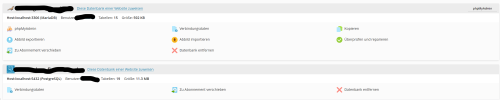
Is there a quick solution like an extension or some functionality I need to activate in Plesk?
Thank you for your Support
MariaDB can be simply managed in plesk out of the box with phpMyAdmin.
I have now installed a PostgreSQL database and I cannot see buttons to import or export the database, and also nothing for administration.
Is there a quick solution like an extension or some functionality I need to activate in Plesk?
Thank you for your Support


