• Halloween is coming! To celebrate the occasion, we dusted off a couple of old skins, and even created a brand new one (Pixel).
    To get into the festive spirit, install the Skins extension.
  • The new Python extension is now available. It allows customers to deploy and manage WSGI-based Python applications on their websites directly from Plesk.
  • The Plesk Mobile apps for iOS and Android and the Plesk Mobile Center extension have been deprecated, and are no longer available for new installations. In Plesk Obsidian 18.0.84, the Plesk Mobile Center extension will be removed from servers during the upgrade, and the Plesk Mobile apps will lose their server management features.
  • The Social Login extension has been deprecated and will be removed in Plesk Obsidian 18.0.84. After that, it will no longer be possible to log in to Plesk with a Google, Facebook, GitHub account, or with a passkey. Plesk usernames and passwords, as well as logging in with a WebPros Account, are not affected.

Question Plesk + MySQL (Ubuntu) ?

safemoon

Regular Pleskian
Server operating system version
Ubuntu 22.04.5 LTS
Plesk version and microupdate number
Plesk Obsidian v18.0.81_build1800260925.20 os_Ubuntu 22.04
Hi all,

I’m setting up a new dedicated server with Plesk Obsidian (Web Host Edition) for a few SaaS PHP apps. They need MySQL 8.4: they use
Code:
INSERT … AS alias ON DUPLICATE KEY UPDATE, FOR SHARE, CAST AS JSON and BIN_TO_UUID
. Porting to MariaDB was tested and isn’t an option.

I want MySQL 8.4 as the only database server, used by Plesk itself too, with no MariaDB installed at all. (IF POSSIBLE)

Plesk lists MySQL 8.4 as supported from 18.0.76. But forum reports say the installer installs MariaDB by default or removes an existing MySQL.

Questions
  1. What’s the supported way to install Plesk on a clean server with MySQL 8.4 from the start? (without mariadb if possible)
  2. If the only way is to do it via Docker, are there any disadvantages? Can i still manage it somehow like a regular database like all other mariadb databases (phpmyadmin, logs etc) If both database servers are installed what about resources & performance and Plesk OS reliability?
  3. Are there any other suggested ways to run MYSQL Databases for PHP SaaS apps with Plesk?
 
Hi,

8.4 is supported since 18.0.76 according to Plesk’s KB, so you’re fine on 18.0.81. The documented way for a clean install is to install MySQL first and run the Plesk installer afterwards.

1. Clean install with MySQL 8.4
Ubuntu 22.04 ships 8.0, so you’d add the official MySQL APT repo and install 8.4 before launching the installer:
Code:
apt install mysql-server
wget https://autoinstall.plesk.com/plesk-installer
chmod +x plesk-installer
./plesk-installer

Take a snapshot first. I’ve seen a report of the installer removing MySQL on CentOS 8 (Ubuntu 20 worked), and I haven’t tested 8.4 on 22.04 myself. I also can’t promise that no MariaDB package gets pulled in as a dependency, so check with dpkg -l | grep -i mariadb after the install.

2. Docker
It works, as far as I know: run the container, then add it under Tools & Settings > Database Servers (and enable auto-start). Downsides I’d expect, not verified: Plesk itself still uses its own DB, backups and updates of the container are on you, and you have to check that phpMyAdmin and the other DB tools behave the same as with a local server. Two DB servers cost RAM, but if you size the buffer pools sensibly it’s usually manageable.

3. Alternatives
  • A separate MySQL 8.4 server (VM or other host) added as an external database server in Plesk. Cleanest separation, and Plesk keeps its own DB untouched.
  • MySQL 8.4 as an additional local server on another port, with the default DB left alone for Plesk.
If you want MySQL only for your apps, 2 or 3 is the safer bet. If you really need “MySQL only, Plesk included”, test option 1 on a VM first.

Regards
Tessa
 
A separate MySQL 8.4 server (VM or other host) added as an external database server in Plesk. Cleanest separation, and Plesk keeps its own DB untouched.
For this approach i would need the database server to be from the same server provider in the same location for better performance? What kind of specs should i aim for VPS/Cloud is a lot more expensive than a dedicated server?
 
Option 1 would be ideal if there are no issues, can anyone else confirm this is working? Ubuntu 22 is not an issue, i can get a new server and install ubuntu 26 if that is better?
 
Hi @safemoon,


Good news first: Ubuntu 26.04 ships MySQL 8.4 in its own repos (mysql-server 8.4.x), so on 26.04 you don’t need any third-party repo. That makes option 1 simpler than on 22.04, where you’d have to add the official MySQL repo (my earlier snippet only fits 26.04, sorry for that). So yes, I’d go with a fresh 26.04 server for this. Plesk 18.0.82 already runs on it.

Sequence per Plesk’s KB: install MySQL first, then the Plesk installer:
Code:
apt install mysql-server
wget https://autoinstall.plesk.com/plesk-installer
chmod +x plesk-installer
./plesk-installer

I can’t confirm from my own experience that the installer leaves MySQL alone on 26.04, so please take a snapshot before and check afterwards:
Code:
dpkg -l | grep -i -E “mysql|mariadb”

If someone here has run exactly this combination, please chime in.

About the external server: keep it in the same datacenter (ideally on a private network), because apps with lots of small queries feel every millisecond of latency. Sizing depends entirely on your data size and load, so I can’t give honest numbers. A dedicated box works as well as a VPS, nothing in Plesk requires a VPS. But for a single server setup, option 1 is less work and has fewer moving parts.

Regards
Tessa
 
Hi @safemoon,


mhhhh... worth a try. :cool: You can put the MariaDB packages on hold before running the Plesk installer, so apt won’t pull them in:
Code:
apt-mark hold mariadb-server mariadb-client mariadb-common

If Plesk needs MariaDB as a dependency, the installer will stop with a conflict instead of silently installing it, which is actually useful to know. Do this on a snapshot or fresh server first. If the installer errors out, remove the hold with apt-mark unhold ... and we’ll see what it complains about. Afterwards, check with dpkg -l | grep -i -E "mysql|mariadb".

Regards
Tessa
 
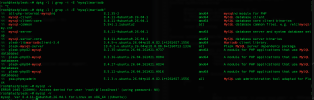
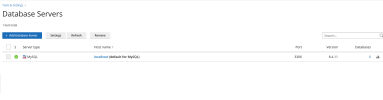
I spawned a new cloud server and run the following commands
Plesk was successfully installed with MYSQL Database server.

Do i need to do anything else now? Is Plesk fully compatible with mysql now?

Code:
apt update && apt upgrade -y
apt install mysql-server -y

mysql_secure_installation

wget https://autoinstall.plesk.com/plesk-installer
chmod +x ./plesk-installer
./plesk-installer --web-interface
 

Attachments

  • IXXO-2026-10-29-20-41-43.png
    IXXO-2026-10-29-20-41-43.png
    46.1 KB · Views: 0
  • IXXO-2026-10-29-20-44-32.png
    IXXO-2026-10-29-20-44-32.png
    28.6 KB · Views: 0
Back
Top