
 Facebook
 Twitter
budiantoip
New Pleskian
- Server operating system version
- Ubuntu 22.04.5 LTS
- Plesk version and microupdate number
- 18.0.74.3
Hello, I accidentally changed my Plesk's Default Site.
The page can be accessed from Tools & Settings > Tools & Resources > IP Addresses. I clicked an IP and then, this form is displayed:
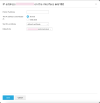
Previously, the Default site was set to none, but I changed it to a site. I want to change it back to none, but I'm unable to. Is there a way to rollback the changes, probably via terminal or Plesk CLI?
All sites hosted in the server are working, but I cannot access Plesk GUI.
The page can be accessed from Tools & Settings > Tools & Resources > IP Addresses. I clicked an IP and then, this form is displayed:
Previously, the Default site was set to none, but I changed it to a site. I want to change it back to none, but I'm unable to. Is there a way to rollback the changes, probably via terminal or Plesk CLI?
All sites hosted in the server are working, but I cannot access Plesk GUI.

