• The new Python extension is now available. It allows customers to deploy and manage WSGI-based Python applications on their websites directly from Plesk.
  • The Plesk Mobile apps for iOS and Android and the Plesk Mobile Center extension have been deprecated, and are no longer available for new installations. In Plesk Obsidian 18.0.84, the Plesk Mobile Center extension will be removed from servers during the upgrade, and the Plesk Mobile apps will lose their server management features.
  • The Social Login extension has been deprecated and will be removed in Plesk Obsidian 18.0.84. After that, it will no longer be possible to log in to Plesk with a Google, Facebook, GitHub account, or with a passkey. Plesk usernames and passwords, as well as logging in with a WebPros Account, are not affected.

Question Plesk on Ubuntu 16.04 (AWS) cannot update PHP 7.4.16 to 7.4.33: how to fix this?

ss4u

New Pleskian
Server operating system version
Ubuntu 16.04.7
Plesk version and microupdate number
Obsidian 18.0.34
Hello,
Our server runs PHP 7.4.16, which is affected by known security vulnerabilities, and we need to apply the security patches. However, PHP 7.4.33 never shows up as an update in Plesk, and I’d like advice on how to solve this.
Environment
  • Cloud: AWS EC2, Europe (Frankfurt)
  • OS: Ubuntu 16.04.7 LTS (end of support)
  • Plesk: Plesk Obsidian, installed in 2021 (version: [Obsidian 18.0.34])
  • PHP: 7.4.16
  • Hosts 4 domains, including a CakePHP application
  • Mail: hosted on this server
Issue
  • The server hosts live client sites, and the PHP version has known vulnerabilities, so we want to update to reduce the risk.
  • Plesk shows no update for PHP 7.4.33. The panel receives no further updates for Ubuntu 16.04, so the PHP package stays at 7.4.16.
  • Both Plesk (2021) and PHP 7.4 are outdated and out of security support.
  • I need a safe way to get to a supported setup with minimal downtime.
Questions
  1. What is the recommended way to get PHP 7.4.33 for these sites when the OS is no longer supported by Plesk?
  2. Is an in-place upgrade of Ubuntu and Plesk realistic from this state, or is there a better approach?
  3. What should I check or back up beforehand to avoid breaking the CakePHP application, mail and SSL certificates?
  4. Anything specific to watch for with CakePHP when changing PHP versions?
Thank you for your help.
 

Attachments

  • plesk_image.png
    plesk_image.png
    54.4 KB · Views: 1
best is to get a new VM with a supported OS and migrate Plesk there
 
The OS on your server is severely outdated (!) and as a result hasn't been supported by Plesk for a long time. An in-place upgrade is highly unpractical at this stage, as you have to upgrade to intermitted OS releases. The recommended approach would to spin up a new server with a modern OS and migrate your data, with Plesk Migrator, as suggested by @Martin Dias. The guide Marin linked to should help you prepare.

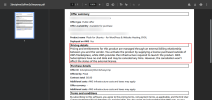
A word of cation, Plesk generously backported fixes for the recent vulnerabilities (2026-109618 and CVE-2026-109619) to PHP 7.4.33. But has not (and will likely not) fix any other (older or newer) vulnerabilities for the 7.4 branch. It's recommend to upgrade your CakePHP applications too, so they are compatible with newer (still supported) PHP versions.
 
Hi Martin and Kaspar,

Thank you both for the clear guidance. I understand now that an in-place upgrade of Ubuntu 16.04 is not practical, so I will go with a new server running a supported OS and move everything over with Plesk Migrator. I will also plan to upgrade the CakePHP applications to a supported PHP 8.4 version.

Before I start, I have a few follow-up questions:

1. Which Ubuntu version do you recommend for the new server (22.04 or 24.04), and does the Plesk Obsidian version on the new server need to match or be newer than the old one (18.0.34) for Migrator to work?
2. What should I back up or verify on the old server beforehand? I plan to take a full EC2 snapshot and a Plesk backup. Is there anything else I should note down (DNS records, mail settings, SPF/DKIM)?
3. Will Plesk Migrator carry over mailboxes with existing emails, databases, and Let's Encrypt/custom SSL certificates, or do any of these need to be handled manually?
4. To keep downtime minimal, is it fine to test the sites on the new server first (for example via a hosts file entry), and then lower the DNS TTL and switch the A/MX records once everything is verified?
5. Are there known issues when migrating CakePHP applications from PHP 7.4 to PHP 8.4 on Plesk that I should check beforehand?'
 
Hi Martin,

Thank you for the quick and clear answers. I will go with Ubuntu 24.04 and the latest Plesk Obsidian on the new server, and use Plesk Migrator. I will also go through the known limitations page you shared, and test the sites on the new server before switching DNS.

I will mark the thread as resolved once the migration is complete.

Thanks again to you and Kaspar for your help.
 
Hi,
I have a few questions regarding the Plesk migration and AWS Marketplace:
  1. The old Plesk server hosts four domains. We need to migrate only one domain, along with its related websites, subdomains, email accounts, SSL certificates, and other configurations. Is this possible using the Plesk Migration Tool?
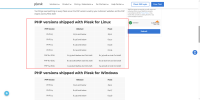
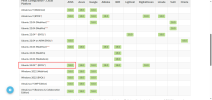
  2. If we purchase the latest Plesk image from AWS Marketplace with Ubuntu 22.04, will it support PHP 7.4.33? I have attached a screenshot for reference.
  3. Could you please clarify the billing? If we purchase the Plesk image from AWS Marketplace, will we be charged separately for the EC2 instance and the Plesk license, or will the hourly Plesk image cost include the EC2 instance?
 

Attachments

  • Plesk-PHP-Security-Update-CVE-2026-109618-CV.png
    Plesk-PHP-Security-Update-CVE-2026-109618-CV.png
    166 KB · Views: 5
  • Plesk-for-Ubuntu-for-WordPress-Website-Hosting-BYOL-AWS-Marketplace.png
    Plesk-for-Ubuntu-for-WordPress-Website-Hosting-BYOL-AWS-Marketplace.png
    332.1 KB · Views: 5
1. Yes, you can select only certain subscriptions to migrate
2. Yes, but I would not recommend Ubuntu 22 as it will be EOL May 2027
3. Since its a BYOL image you will only pay the VM and use then your own Plesk license. for the non BYOL AWS charges both at the same time as far as I am aware. If you want you can clarify that with the sales team: Contact Us - Plesk Support Will Help
 
We have purchased the free trial Plesk image license through the AWS Marketplace. The selected image is Plesk Ubuntu for WordPress & Website Hosting (ARM), BYOL.

We installed the Plesk Migration Tool on the new EC2 instance in AWS, which is running the Plesk image, and started a new migration. We selected the vivikola.ch subscription for migration.

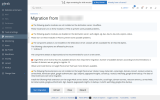
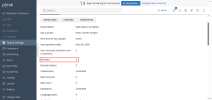
During the pre-migration check, we found that the subscription(vivikola.ch) includes approximately 30 GB of storage and 10 domains, whereas the trial licence has a 3-domain limit

We are currently stuck at this stage of the migration. I have attached a screenshot for your reference.
Any guidance or recommended workaround would be appreciated.

Thanks in advance.
 

Attachments

  • plesk_premigration_check.png
    plesk_premigration_check.png
    245.7 KB · Views: 2
  • plesk_image.png
    plesk_image.png
    106.5 KB · Views: 2
BYOL stands for Bring Your Own License. Meaning AWS won't provide you with a full license and you need to purchase and install your own license on the server to keep using Plesk after the trail periode and to circumvent the trail license restrictions. Since you're going to need a license anyway, the easiest way is to advance with your migration is to go ahead and purchase the license you need for production. You can buy a license directly from Plesk or from a reseller.
 
@Softsolutions4u

As @Martin Dias and @Kaspar have pointed out, there some (read: many) caveats in your approach.

It - really - is best to

1 - start over with Ubuntu 24.04.5 LTS (as opposed to 22.04) : otherwise, you will have to migrate again in 2027

2 - consider to stay away from AWS : not the best solution for what you are trying to achieve and/or for what you are hosting ...... any simple VPS with sufficient storage and memory will do (and hence the quirks and oddities of AWS might be prevented ! )

3 - some of the VPSes on the market are offered with a free Plesk Web admin license : 10 domains for free ....

4 - consider to stay away from Plesk Web Admin license (it will limit you in many ways), really consider the Plesk Web Pro license (it gives you all you need)

5 - install a fresh Plesk 18.0.82.3 instance on a (small) dedicated server or a (larger) VPS, with Ubuntu 24.04.5 LTS as the OS

6 - install the Plesk Web Pro license : just enter the activation code

7 - after completing the installation, start migrating the (very old) data from the old AWS server to the new Plesk server

8 - keep the old AWS server for the time being : it is essentially your backup

9 - update all site related packages on the new Plesk server : PHP, CakePHP and whatever needs to be updated

10 - if (and only if) the updates on the new Plesk server work like charm, then cancel the AWS server


It simply is best to make a rock-solid plan for now and the future, before trying to attempt all kinds of odd migrations or updates.

And, as has been pointed out before, there are no workarounds for things that cannot be worked around : licenses have to be paid for (and it is worth it), PHP and OSes have to be updated (otherwise you will sooner or later spend hours and hours, trying to solve issues that cannot be solved anymore etc etc).

It might take some time (and more steps than the rough outlines of step 1 to 10 above), but it is worth it.


Kind regards...
 
Thank you for all your feedback. I would like to share a few points from our side to provide some additional context.

1. Current Production Environment (Old Server)​

We are relatively new to Plesk and have been assigned a server migration task.
Our existing production server has the following configuration:
  • Hosting: AWS EC2
  • Deployment: AWS Marketplace image – Plesk for Ubuntu - WordPress & Website Hosting Environment
  • Plesk Version: Plesk Obsidian 18.0.34
  • Operating System: Ubuntu 16.04.7 LTS
  • Total Subscriptions: 4
  • Current PHP Version: PHP 7.4.16
Due to PHP security vulnerabilities, our client wants to upgrade the PHP version. The existing server is running PHP 7.4.16, and we need to upgrade it to PHP 7.4.33 (security patch release).
Currently, there are four subscriptions hosted on the old Plesk server. However, our client wants to migrate only one subscription at this stage.

2. Testing Environment (Before Making Any Changes to Production)​

Since we are new to this process, we wanted to set up a test environment first, perform the migration, and understand the process using the free trial. Our intention was to avoid making any direct changes to the production environment without prior testing.
We have set up the following testing environment:
  • Hosting: New AWS EC2 instance
  • Deployment: AWS Marketplace image – Plesk Ubuntu for WordPress & Website Hosting (ARM), BYOL, 14-day free trial
However, we are currently stuck at the pre-migration check because the free trial license allows only three domains.
There is another limitation we have encountered. Since our client is already using a Plesk image from AWS Marketplace, they do not want to switch to a different server or hosting platform.
Additionally, the Plesk Migration Tool migrates an entire subscription as a single unit. Individual domains or subdomains within a subscription cannot be excluded during migration. Unfortunately, the subscription we need to migrate contains 10 individual domains/subdomains.

3. We Would Appreciate Your Guidance on the Following Questions​

Question 1: Is there any possible workaround within the Plesk free trial environment?
The free trial currently allows only three domains, whereas our subscription contains 10 individual domains/subdomains. Is there any way to overcome this limitation so that we can complete the migration testing before proceeding with production?
Question 2: Can we proceed directly with the production migration by purchasing the required Plesk license?
If testing through the free trial is not possible, can we purchase the required license and perform the migration directly in the production environment?
Could someone from the Plesk team please confirm whether this is a safe and recommended approach? We would also like to understand whether the migration process could affect the existing production environment or cause any downtime or service interruptions.
Since this is our first Plesk migration, we want to make sure we follow the correct procedure and avoid any unexpected issues.
We would really appreciate your guidance and recommendations on the best way to proceed.
Let me know if you need any screenshots for reference.
Thank you for your support.
 
Question 1: Is there any possible workaround within the Plesk free trial environment?
The free trial currently allows only three domains, whereas our subscription contains 10 individual domains/subdomains. Is there any way to overcome this limitation so that we can complete the migration testing before proceeding with production?
You can request a full-featured temporary license (without any domain limitation) for migration by contacting the Licensing and Purchase Support team. More info can be read here. This allows you to migrate and test before purchasing and installing a full license yourself.

Question 2: Can we proceed directly with the production migration by purchasing the required Plesk license?
If testing through the free trial is not possible, can we purchase the required license and perform the migration directly in the production environment?
Absolutely. The type of license does not really matter, aside for from the domain limit on the default trail license. Whatever license you use, you can always migrate, test and if anything goes wrong re-image the AWS instance to start over again as long as the source server is still running. And if you keep a Plesk backup, you can always use that too.

We would also like to understand whether the migration process could affect the existing production environment or cause any downtime or service interruptions.
The migration does not impact or influence the running source server. There is usually no downtime, but that kind off depends on how you manage DNS updates. If you manage the DNS zones manually, you are in control on when to switch over.

There is a Plesk Migration and Transfer Guide that might be useful to read. I'd also recommend familiarizing yourself with the known migration limitations too.
 
Last edited:
Migrating a domain between two Plesk servers on AWS: is this DNS cutover plan correct?
Hi all,
We're migrating a domain from an old Plesk server to a new Plesk server, both running on AWS EC2. The domain’s DNS is hosted in Route 53. This is my plan:
  1. Copy the site files and database to the new Plesk server.
  2. Test the site on the new server before DNS changes (hosts-file override).
  3. Allocate a new Elastic IP in AWS and associate it with the new EC2 instance. Open the required ports in the security group.
  4. In Route 53, lower the TTL of the domain’s A records (e.g. to 300) ahead of the switch.
  5. At cutover, go to Route 53 → Hosted zones → (domain) → A record → Edit record, set the new IP, and save.
  6. Visitors should then reach the new server instead of the old one.
My questions:
  • Is this approach correct, or am I missing anything?
  • What’s the best way to handle SSL (Let’s Encrypt) on the new server during the switch?
  • Should I disable Plesk DNS for the domain, since Route 53 is the authority?
  • Any recommendations for avoiding data loss between the final sync and the DNS switch?
Thanks!
 
We have selected the following Plesk image from the AWS Marketplace:
Product name: Plesk Ubuntu for WordPress & Website Hosting (ARM), BYOL
Operating System: Ubuntu 24.04
Kindly share the official pricing details and the relevant pricing link for this Plesk image.
Also, please provide the official Plesk documentation or reference guide explaining how to activate the Plesk license on the server.
I have attached a screenshot for your reference.
 

Attachments

  • Support-of-Cloud-Platforms.png
    Support-of-Cloud-Platforms.png
    119 KB · Views: 7
  • aws-image.png
    aws-image.png
    197.8 KB · Views: 6
Hi @Softsolutions4u,

Yes, your DNS cutover plan is basically correct. I would add the following checks, especially since you are moving mail as well.

1. Verify the image architecture first

You mentioned Ubuntu 24.04 on ARM. Please double-check that combination: your screenshot lists “Ubuntu 22.04 on ARM” separately from the general Ubuntu 24.04 image. The general Ubuntu 24.04 listing does not automatically confirm ARM support.

Check the actual instance:

Code:
cat /etc/os-release
uname -m
plesk version

“aarch64” means ARM; “x86_64” means Intel/AMD.

Compare the result against Plesk’s official requirements before continuing:

Also verify that your required PHP version and any application extensions are available for that exact OS/architecture.

2. BYOL pricing and activation

BYOL means you purchase the Plesk license separately. The $0.00 shown in your Marketplace offer is not the total hosting cost: AWS infrastructure charges still apply, and you need a valid Plesk license after the trial.

Official Plesk pricing:

AWS infrastructure estimate:

Use the current Plesk checkout price for your currency, billing term, and applicable taxes rather than an old forum quotation.

You do not automatically need Web Pro just because the subscription contains “10 domains/subdomains”. Genuine Plesk subdomains and domain aliases do not count towards the license’s domain limit; separately added domains do.

Official explanation:

To activate the purchased license, open:

Tools & Settings > License Information > Install Key

Enter the activation code received after purchase. Older versions may call this section “License Management”.

Official activation documentation:

Installing the license does not switch traffic. You can still migrate and test before making DNS changes.

3. Initial migration and testing

Use Plesk Migrator rather than copying only website files and databases. Review its report and recreate anything not migrated, such as custom server configuration.

Assign the destination Elastic IP before final testing, verify Plesk’s public/private IP mapping, and allow the required traffic through both the AWS security group and the server firewall.

Your hosts-file approach is correct:

Code:
NEW_ELASTIC_IP example.com www.example.com

Test HTTPS, authentication, forms, uploads, database writes, and mail. Prevent the test copy from sending duplicate customer emails or running production background jobs.

4. Route 53 and Plesk DNS

Lower TTL to 300 seconds ahead of cutover, then wait at least the previous TTL before switching. Previously cached answers retain their original expiry.

Update every relevant record, not just the root A record:

- Root domain, www, and any separately addressed subdomains.
- AAAA records, if IPv6 is published.
- Mail/webmail hostnames and any other services moving with the subscription.
- SPF and DKIM records where required.

Do not change records unnecessarily. For example, an MX record pointing to mail.example.com can stay unchanged if only that hostname’s A record needs updating.

Keep Route 53 nameservers unchanged.

You may disable the local Plesk DNS service for this domain if nothing depends on it, but this is not required for cutover. Public clients use the authoritative DNS delegation. Editing a Plesk zone does not update Route 53 unless you explicitly configured an integration.

5. SSL: have a valid certificate ready before cutover

An IP change alone does not require a new certificate.

Verify that the existing certificate and private key migrated successfully, assign the certificate to the destination website, and test HTTPS with your hosts-file override. Check mail and webmail certificates separately.

Plesk documents that domain-level certificates are migrated, but certificates in the server-wide repository are not.

If you need a new certificate before switching DNS, DNS-01 validation is an option: publish the required TXT record in Route 53 and check how renewals will be handled.

For HTTP-01 issuance after cutover, public DNS must reach the destination and port 80 must be accessible. Avoid switching visitors to a server without a valid certificate while waiting for issuance.

6. Final sync and preventing data loss

The key is to avoid two writable copies of the application:

- Take verified backups.
- Put the old application into maintenance/read-only mode.
- Pause old-server cron jobs, queues, and other writers.
- Run the final website/database synchronization.
- Verify the destination, then update Route 53.
- Enable normal operation and background jobs on the new server only.

Keep the old application read-only while cached DNS answers expire. Some visitors may briefly see maintenance mode, but that is safer than accepting orders or uploads on two separate servers.

Mail needs separate attention: some messages may still reach the old server during DNS cache expiry. Keep it available and perform a final mail resynchronization after routing settles. Verify inbound/outbound mail, SPF, DKIM, reverse DNS, and AWS outbound SMTP restrictions.

Keep the old instance intact until everything is verified. However, once the new server accepts writes, simply switching DNS back can lose new data; rollback then requires data reconciliation.

Finally, test CakePHP compatibility with your target PHP version before cutover. A successful migration does not prove the application is compatible with PHP 8.x.

Official migration guide:

Migration limitations, including certificate handling and temporary migration licensing:

Regards
Tessa
 
Back
Top