
 Facebook
 Twitter
I want to use Gmail to host my email. I have already confirmed my domain and now I can successfully send emails via my domain.
However in order to receive emails I need to add/update the MX records on my server. I did that (I think) but now, 24h later, the records don't seem to be updated yet.
For instance intodns.com still shows that there is only one MX record: http://www.intodns.com/c-sharx.net
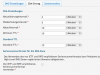
This is my setup where you can clearly see the MX records required by Google:
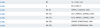
I changed the TTL to some minutes but still the changes don't seem to be propagated.
The screenshots are taken from "Website & Domains" -> my domain -> DNS - that should be the right thing to change, correct?
However in order to receive emails I need to add/update the MX records on my server. I did that (I think) but now, 24h later, the records don't seem to be updated yet.
For instance intodns.com still shows that there is only one MX record: http://www.intodns.com/c-sharx.net
This is my setup where you can clearly see the MX records required by Google:
I changed the TTL to some minutes but still the changes don't seem to be propagated.
The screenshots are taken from "Website & Domains" -> my domain -> DNS - that should be the right thing to change, correct?

