
 Facebook
 Twitter
P_heck
Basic Pleskian
Hello!
following the article https://kb.plesk.com/en/128733, I tried to enable http/2 - but without success. Test at https://tools.keycdn.com/http2-test still say that there is no http/2 support enabled.
Config:
Special nginx directives used (example for one deomain - others configured the same way):
I also followed the troubleshooting guide at https://kb.plesk.com/en/128766:
The #/usr/local/psa/bin/http2_pref enable command is not inserting the http2 directive in the nginx.conf files at /var/www.vhost/system/domain.tld/conf. It shows for example:
instead of
Also looking at the script /usr/local/psa/bin/http2_pref, I can not see, that any configuration in the nginx.conf is changed to insert the statement itself:
So assumption is, that it will be applied using the default templates during the reconfigure command.
Searching in the template directory for "http2", I found following entry in /usr/local/psa/admin/conf/templates/default/domain/nginxDomainVirtualHost.php :
Not sure, what is the trigger to set the ssl in the right way here.
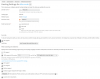
Here a screenshot of the config of one domain:
@Anyone & Plesk Support: Any idea how to solve this problem?
Cheers Peter
following the article https://kb.plesk.com/en/128733, I tried to enable http/2 - but without success. Test at https://tools.keycdn.com/http2-test still say that there is no http/2 support enabled.
Config:
- Plesk version 12.5.30 Update #30
- NGINX version 1.9.14-debian7.0.16040615
- All websites configured to use NGINX, force https using Let's Encrypt certificates
Special nginx directives used (example for one deomain - others configured the same way):
Code:
if (!-e $request_filename){
    rewrite ^(.*)$ /index.php break;
}

location ~* \.(js|css|png|jpg|jpeg|gif|ico)$ {
    expires 30d;
    add_header Pragma public;
    add_header Cache-Control "public";
    try_files $uri @fallback;
}

gzip on;
gzip_proxied any;
gzip_types text/plain [s]text/html[/s] text/css application/json application/x-javascript text/xml application/xml application/xml+rss text/javascript application/javascript text/x-js;
gzip_vary on;
gzip_disable "MSIE [1-6]\.(?!.*SV1)";

if ($request_uri = /) {
    set $test  A;
}
if ($scheme = 'http') {
    set $test  "${test}B";
}
if ($test = AB) {
    rewrite  ^/(.*)$  https://kikura.de/$1  permanent;
}

add_header Strict-Transport-Security max-age=31536000;
add_header X-Frame-Options SAMEORIGIN;
I also followed the troubleshooting guide at https://kb.plesk.com/en/128766:
- openssl command proves: only http1.1 is available
- openssl is in the right version: 1.0.1e-2+deb7u20
- All websites configured to use SSL
- NGINX is enabled and used by all websites
- No custom configuration files exists (no directory /usr/local/psa/admin/conf/templates/custom exists at all)
- /usr/local/psa/admin/conf/panel.ini only contains one entry which is the one mentioned here :
[webserver]
nginxHttp2 = true
The #/usr/local/psa/bin/http2_pref enable command is not inserting the http2 directive in the nginx.conf files at /var/www.vhost/system/domain.tld/conf. It shows for example:
server {
listen 148.251.9.86:443 ssl;
instead of
server {
listen 148.251.9.86:443 http2 ssl;
Also looking at the script /usr/local/psa/bin/http2_pref, I can not see, that any configuration in the nginx.conf is changed to insert the statement itself:
do_enable()
{
check_openssl_version || exit 1
check_custom_templates
check_nginx || exit 1
set_config_param "true"
$root_d/admin/sbin/sslmng -s nginx --custom --ciphers="$ciphers" --protocols="$protocols"
$root_d/admin/sbin/httpdmng --reconfigure-all
}
So assumption is, that it will be applied using the default templates during the reconfigure command.
Searching in the template directory for "http2", I found following entry in /usr/local/psa/admin/conf/templates/default/domain/nginxDomainVirtualHost.php :
Code:
server {
    listen <?php echo $OPT['ipAddress']->escapedAddress . ':' . $OPT['frontendPort'] .
        ($OPT['default'] ? ' default_server' : '') . ($OPT['ssl'] ? ' ssl' : '') .
        ($OPT['ssl'] && $VAR->domain->physicalHosting->proxySettings['nginxHttp2'] ? ' http2' : '') ?>;
Not sure, what is the trigger to set the ssl in the right way here.
Here a screenshot of the config of one domain:
@Anyone & Plesk Support: Any idea how to solve this problem?
Cheers Peter

