• The APS Catalog has been deprecated and removed from all Plesk Obsidian versions.
    Applications already installed from the APS Catalog will continue working. However, Plesk will no longer provide support for APS applications.
  • Please be aware: with the Plesk Obsidian 18.0.78 release, the support for the ngx_pagespeed.so module will be deprecated and removed from the sw-nginx package.

Issue I can't create a db for postgresql

asukita

New Pleskian
Server operating system version
AlmaLinux 8.9
Plesk version and microupdate number
Plesk Obsidian Web Pro Edition 18.0.58 Update #2
Hi

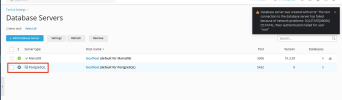
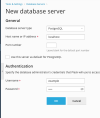
I have recently purchased a pro account. When I am going to create a database for postgresql I get the next warning message

Database server was created with error: The test connection to the database server has failed because of network problems: SQLSTATE[08006] [7] FATAL: Peer authentication failed for user "root"

In Tools & Setting / Plesk Component I can see postgresql-server installed

postgresql-server10.23-4.module_el8.9.0+3736+952d0ed7.alma.1


Thanks in advanced
 

Attachments

  • Captura de pantalla 2024-04-18 a las 18.28.07.png
    Captura de pantalla 2024-04-18 a las 18.28.07.png
    79.8 KB · Views: 16
  • Captura de pantalla 2024-04-18 a las 18.29.43.png
    Captura de pantalla 2024-04-18 a las 18.29.43.png
    50.4 KB · Views: 15
In Tools & Setting / Plesk Component I can see postgresql-server installed

postgresql-server10.23-4.module_el8.9.0+3736+952d0ed7.alma.1
That's the Plesk module for PostgreSQL. Not the actual Plesk component which installs the PostgreSQL service.

You can install the PostgreSQL component following this support article:

After which you can configure PostgreSQL as a database server in Plesk following this support article:

EDIT: see post below
 
Last edited:
On second thought, it does actually look like you've successfully installed the Plesk PostgreSQL server component.

Are you using the servers Root credentials to access PostgreSQL? Are you able to login to Plesk with the same Root credentials?
 
Back
Top