Facebook
 Twitter
soluciones.esystem
New Pleskian
- Server operating system version
- almalinux 8.10
- Plesk version and microupdate number
- Plesk obsidian 18.0.67
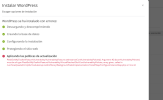
I get the following error when installing wordpress with wordpress toolkit
WP Toolkit version
Version 6.5.4-8879
and Plesk Obsidian 18.0.67
Has it happened to anyone else?
PleskExt\WpToolkit\Feature\Vulnerability\VulnerabilityFeature::setInstanceCoreVulnerabilityPolicies(): Argument #2 ($coreVulnerabilityPolicies) must be of type PleskExt\WpToolkit\Feature\Vulnerability\VirtualPatches\Dto\CoreVulnerabilityPolicies, array given, called in /usr/local/psa/admin/plib/modules/wp-toolkit/library/BackgroundTasksImplementation/Install/Step/ConfigureInstanceStep.php on line 44
WP Toolkit version
Version 6.5.4-8879
and Plesk Obsidian 18.0.67
Has it happened to anyone else?
PleskExt\WpToolkit\Feature\Vulnerability\VulnerabilityFeature::setInstanceCoreVulnerabilityPolicies(): Argument #2 ($coreVulnerabilityPolicies) must be of type PleskExt\WpToolkit\Feature\Vulnerability\VirtualPatches\Dto\CoreVulnerabilityPolicies, array given, called in /usr/local/psa/admin/plib/modules/wp-toolkit/library/BackgroundTasksImplementation/Install/Step/ConfigureInstanceStep.php on line 44