• Debian 11 is approaching its end-of-life (vendor EOL date - August 31, 2026). Plesk Obsidian 18.0.80 will be the last release to support it.
    If you are running Plesk Obsidian on Debian 11, we recommend you upgrade those servers to Debian 12 using our dist-upgrade tool.
  • We plan to deprecate and remove the support for XML RPC protocol versions earlier than 1.6.9.1 in Plesk Obsidian 18.0.82. We strongly recommend that you update all existing integrations using earlier versions of the XML RPC protocol to comply with the version 1.6.9.1 specification.

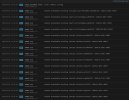
Question I get some "connection refused resolving" infos in system protocol

cpulove

New Pleskian
Server operating system version
Debian 12
Plesk version and microupdate number
Plesk Obsidian 18.0.69 Update 2
Can someone have a look at my syslog entries and explain please, if this is server internal and problematic?
I did a ImmunifyAV Scan with no threads found and all domains seem okay and not infected.
Any Idea what to do elese or how I could find the culprit?
 

Attachments

  • Screenshot 2025-05-01 140004.jpg
    Screenshot 2025-05-01 140004.jpg
    199.4 KB · Views: 10
  • Screenshot 2025-05-01 140231.jpg
    Screenshot 2025-05-01 140231.jpg
    218.9 KB · Views: 10
Those are all IPv6 related entries. If you have IPv6 configured on your server, make sure your IPv6 settings is set correctly, otherwise if you don't use IPv6 then those can be ignored.
 
No, server runs IP4 only, but there are these suspisious entries and I'd like to know where they come from and if there is maybe a customers Domainspace or Wordpress compromised and sending out these requests. MAybe a rootkit somewhere?

Code:
connection refused resolving 'ns500194.hereyourhotlady.com/NS/IN': 34.8.38.57#53
connection refused resolving 'ns500208.sweetkissesclub.com/NS/IN': 34.8.196.142#53

I run my plesk server on top of centos 12 on proxmox ve. All up to date.
 
Update: I added this
Code:
// -- PLEASE ADD YOUR CUSTOM DIRECTIVES BELOW THIS LINE. --
logging {
    category security {
        null;  // Oder auf ein spezielles Logfile umleiten
    };
};

to /etc/nano named.conf

and turned recursive DNS off.

Now these messages are gone and the log does not bloat up anymore.
 
Back
Top