• Debian 11 is approaching its end-of-life (vendor EOL date - August 31, 2026). Plesk Obsidian 18.0.80 will be the last release to support it.
    If you are running Plesk Obsidian on Debian 11, we recommend you upgrade those servers to Debian 12 using our dist-upgrade tool.
  • We plan to deprecate and remove the support for XML RPC protocol versions earlier than 1.6.9.1 in Plesk Obsidian 18.0.82. We strongly recommend that you update all existing integrations using earlier versions of the XML RPC protocol to comply with the version 1.6.9.1 specification.

Issue IIS Hangs and Needs IIS restart

DannyZ

New Pleskian
I have windows Server and Plesk Obsidian 18. Running IIS websites. Just 2 websites, php and mysql website on IIS. Almost everyday, IIS hangs and webpage infinite load state, no errors, just loading. App pool recycle has no effect and only IIS server restart solves this hang. After a period same story. This was not happening before plesk, I bought plesk license and installed it, and this error started. Event viewer and logs show no error or warning.
 
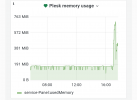
I discovered something. Advanced Monitoring shows extraordinary cpu and ram usage by plesk in a moment. And at the same time IIS hangs. So I thought this is about plesk cronjobs, and I disabled all plesk owned cronjobs, and thats it, no hang anymore. But how can I find out which job cause this error and what if I never activate the jobs again?
 

Attachments

  • Screenshot_20210830-174213~2.png
    Screenshot_20210830-174213~2.png
    59.7 KB · Views: 0
Today at the same time period iis hang occured. Can this be about bots that crawling data from my site content? A bot that runs everyday same time
 
Back
Top