Hi Kaspar, hi LRLD,
this is a known bug in the Monitoring extension: EXTPLESK-7999, described in this KB article:
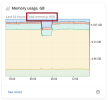
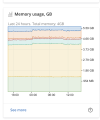
Symptom there is the same as yours: after a hardware change the widget on the home page still shows the old RAM size, and the command that is supposed to detect hardware changes doesn't fix it. The suggested workaround is to delete the Monitoring cache folder (it's only a cache, Monitoring rebuilds it):
Code:
rm -rf /usr/local/psa/var/modules/monitoring/cache
Then reload the Plesk home page (a hard refresh, Ctrl+F5, so the browser doesn't show old data). If the number is still wrong, you can try the detection command from the KB once more and look again:
Code:
plesk ext monitoring --installation --detect-hardware-changes
Two more things:
- In the screenshot the graph itself already seems to scale to the real memory, only the "Total memory" label is stale. That fits a cached hardware value and not a problem with the collected data. That's my guess from the picture, though.
- A comment under the KB article says the bug still exists in Monitoring 2.10.1, so the workaround may not work for everybody, and you may have to repeat it after every hardware change. You can check your version with:
Code:
plesk bin extension --list | grep -i monitoring
If the cache deletion doesn't help, post your Monitoring version here and mention EXTPLESK-7999 when you report it, so it ends up on the right ticket.
Regards
Tessa

 Facebook
 Twitter